
The Windows installer is provided after successful payment.
MolNexus
Molecular docking desktop software
Windows desktop scientific software · Available now
Prepare, run, and review molecular docking in one workspace.
MolNexus brings receptor and ligand preparation, interaction-box setup, AutoDock Vina execution with selectable Vina and Vinardo scoring, pose review, interaction analysis in 2D and 3D, and complex export into a focused Windows desktop application.
- Windows 10/11 · 64-bit
- Vina + Vinardo scoring
- Embedded Mol* viewer
Version 0.1.5 · Windows download after successful payment. No product key or activation required.
Scoring function
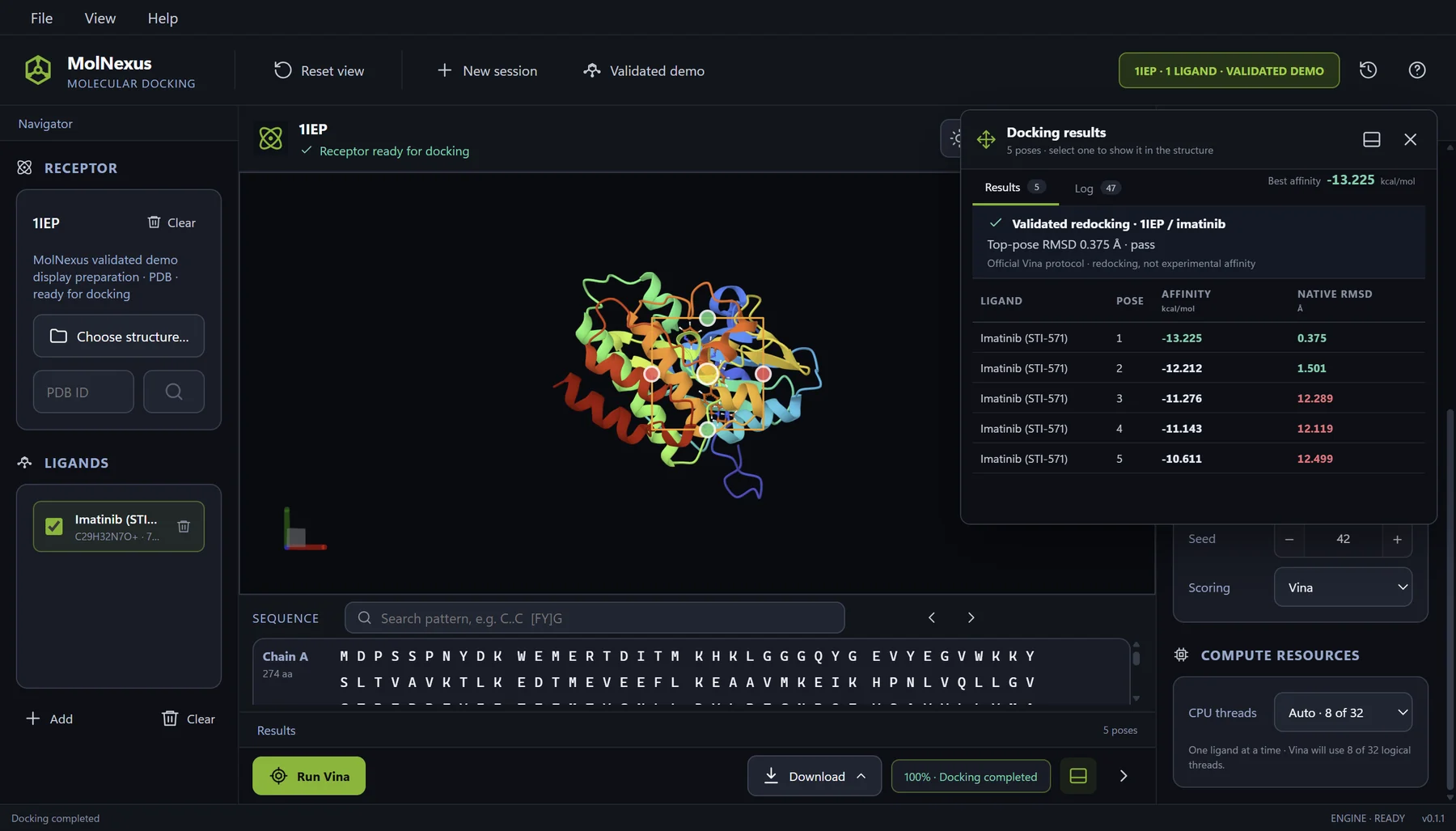
Vina selected
Validated 1IEP/imatinib control · five retained poses
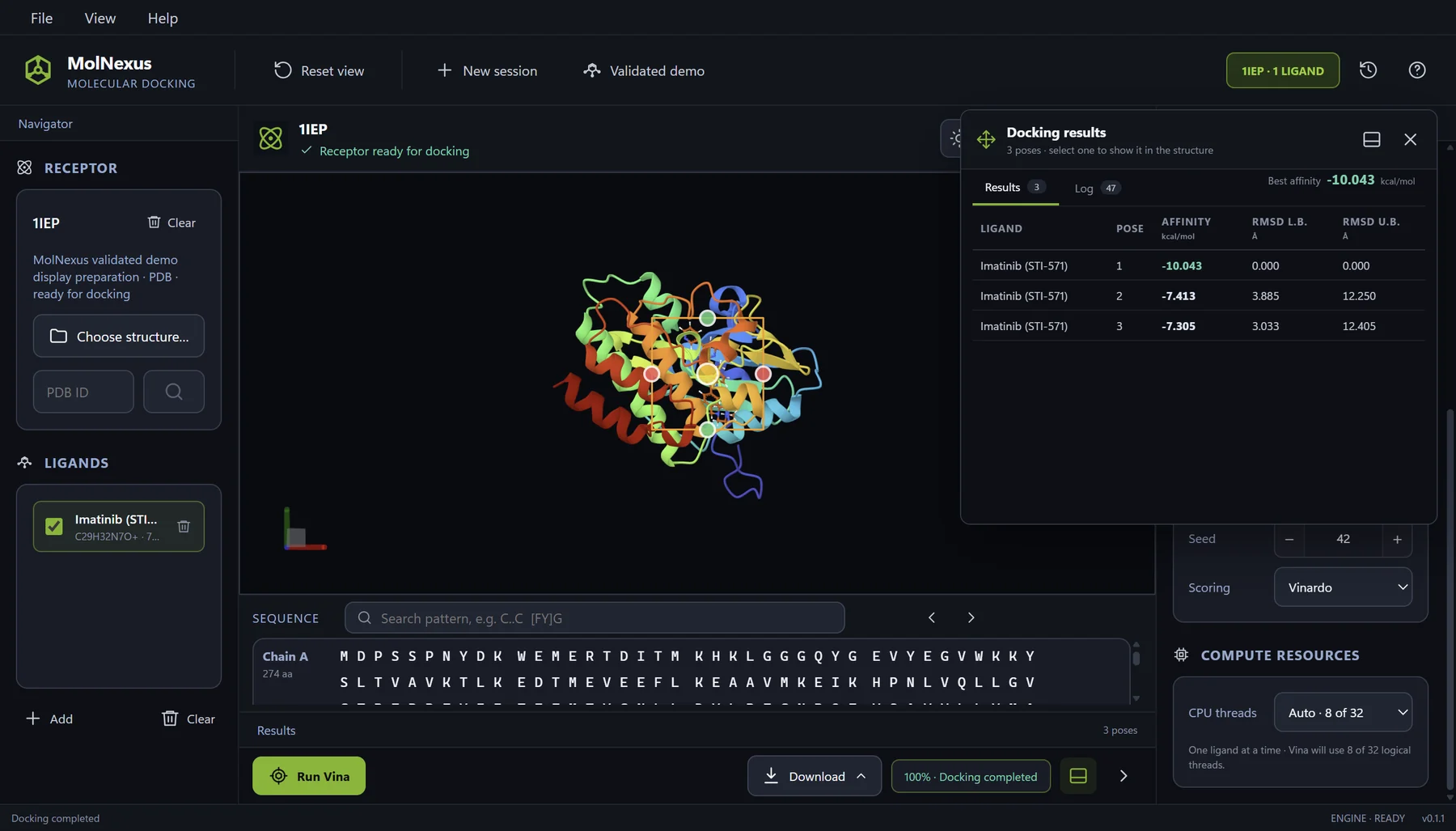
Vinardo selected
1IEP/imatinib interface run · three retained poses
One-time purchase
Download, install, and start working.
After successful payment, download the MolNexus 0.1.5 Windows installer. The application opens directly without a product key or device activation. Keep using the purchased version indefinitely under the published purchase terms.
Keep the last eligible version permanently after that period.
Contact jf.beltran@biochemintelli.com.
MolNexus 0.1.5
US$
299
One-time purchase
- No product key or activation
- Perpetual use of the purchased version
- Installer download after payment
- 12 months of product updates
- Downloadable Windows application
One continuous workflow
Move from molecular inputs to reviewable poses without stitching separate interfaces together.
The preparation, configuration, execution, and review stages remain visible in the same project workspace.
-
01
Load the receptor
Open a local PDB or mmCIF structure, or retrieve a structure by RCSB PDB identifier.
-
02
Prepare the study
Review receptor clean-up decisions, add one or many ligands, and create docking-ready structures.
-
03
Define the search
Position the interaction box, choose Vina or Vinardo scoring, and set exhaustiveness, pose count, energy range, and seed.
-
04
Review and export
Compare affinities and RMSD values, inspect poses in 3D, and export results or protein–ligand complexes.
Molecular interactions · MolNexus 0.1.5
One pose.
Two perspectives.
Connect the 3D binding site with its 2D interaction map. Explore the residues, atom pairs, and distances behind each contact.
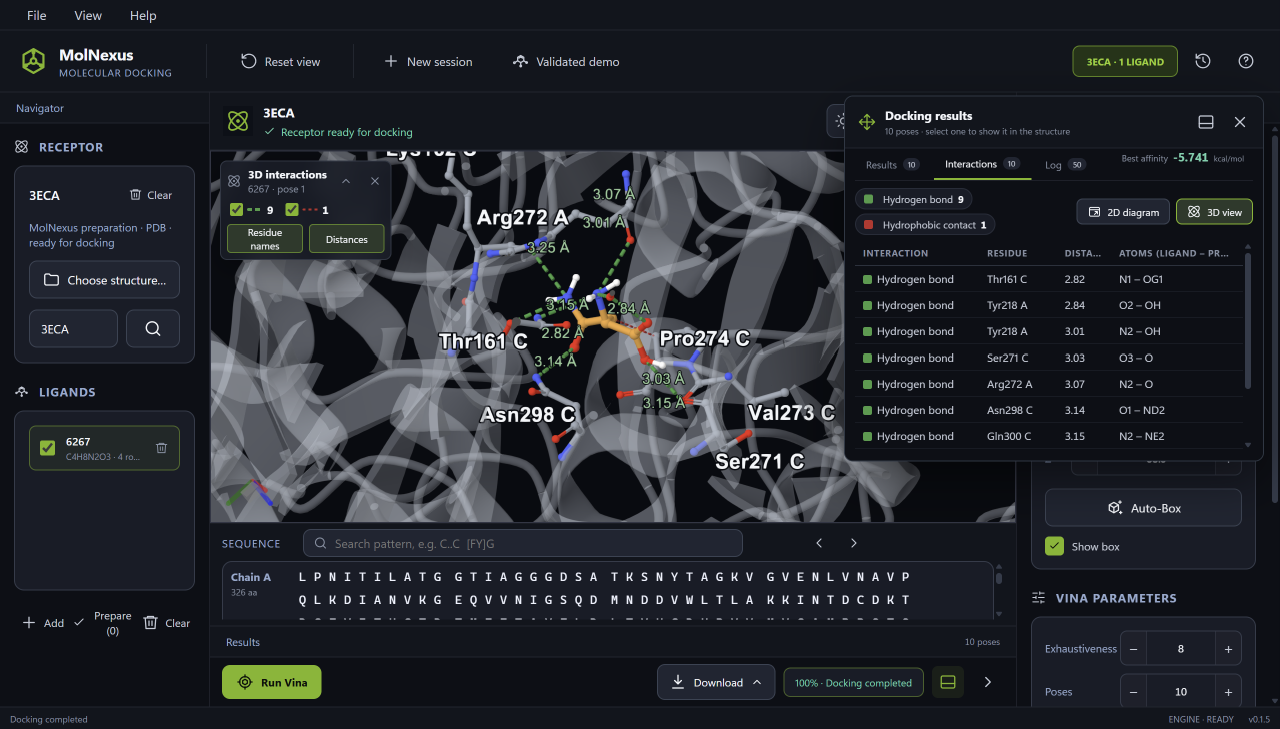
Contacts in their molecular context
Locate the ligand, receptor residues, and contact distances in the 3D view.
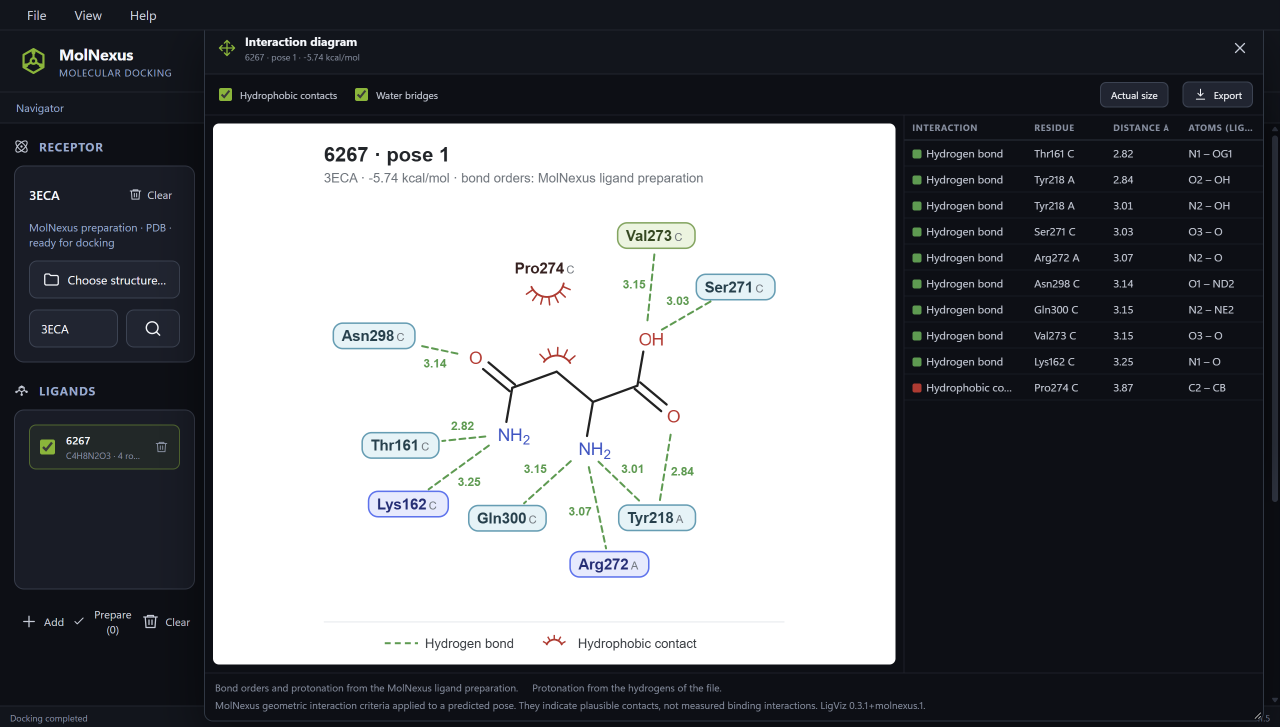
The same pose, mapped in 2D
Trace residue labels and contact types around the ligand in one diagram.
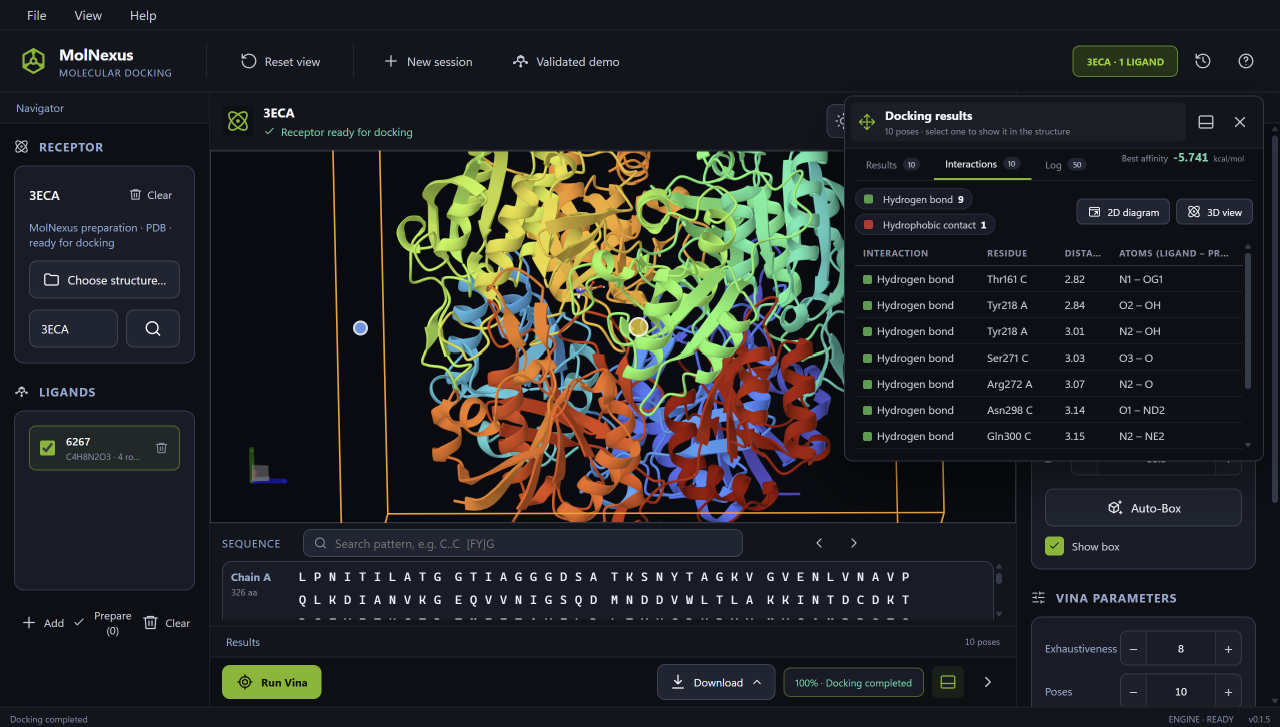
Inspect the details of each contact
Review interaction types, residues, atom pairs, and distances in the table.
1 of 3: 3D interactions
PDB 3ECA · Ligand 6267 · Pose 1
Explore the full workflowContacts use geometric criteria on a predicted pose. They do not establish experimental binding or biological activity.
Complete UI sweep
Follow verified inputs from preparation to saved history.
These authentic captures come from MolNexus 0.1.1 running in Tauri
development mode at revision 06429bb. They document a
1IEP/imatinib Vina redocking control and a CDK2 ligand-preflight
batch. The scoring preview above shows the corresponding Vinardo
selection in the same application workflow.
- Redocking control
- 0.375 Å mode-1 native RMSD
- Ligand preflight
- 2 / 3 / 3 Ready / Review / Rejected
- CDK2 batch
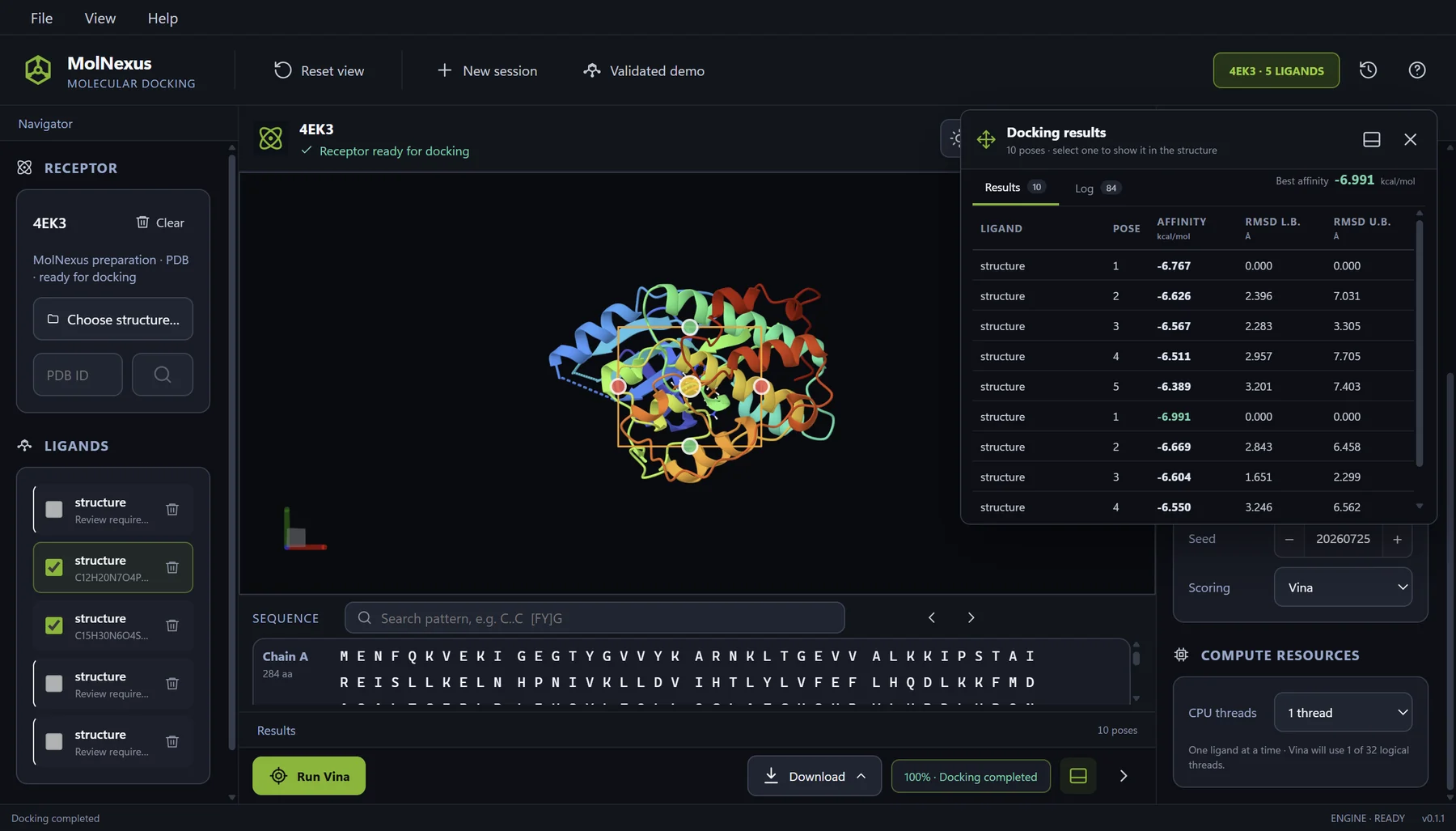
- 2 ligands 10 retained poses
- Displayed output
- −6.991 best CDK2 score shown, kcal/mol
Validated redocking control
Keep the protocol, pose, and result table in one view.
PDB 1IEP, imatinib, the 20 Å cubic search box, Vina settings, the selected molecular pose, and five ranked modes remain visible together for direct review.
Preparation and preflight
Resolve molecular-input decisions before computation.
MolNexus exposes receptor cleanup choices and classifies every ligand source as Ready, Review, or Rejected before docking can begin, rather than hiding preparation behind a progress bar.
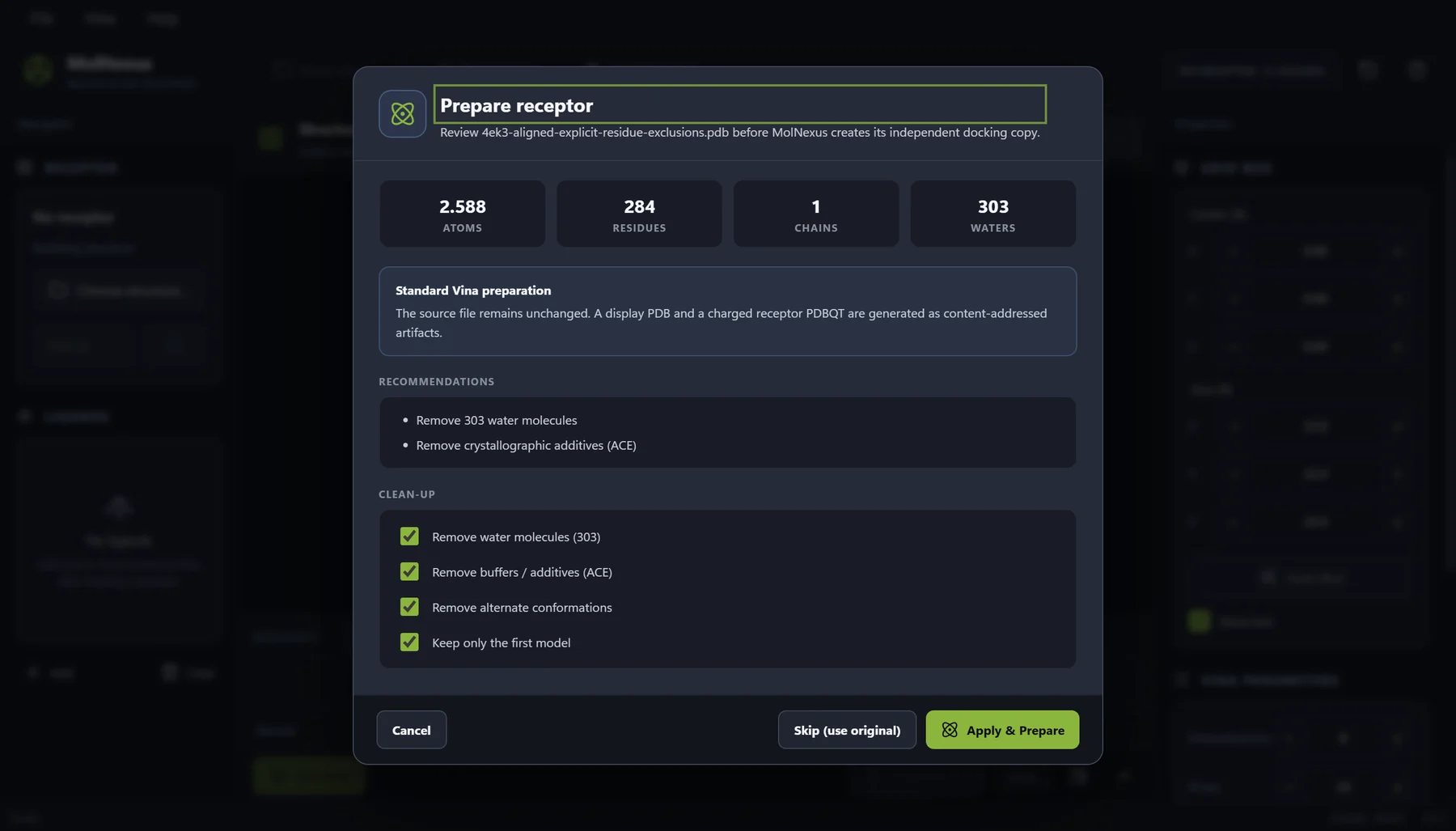
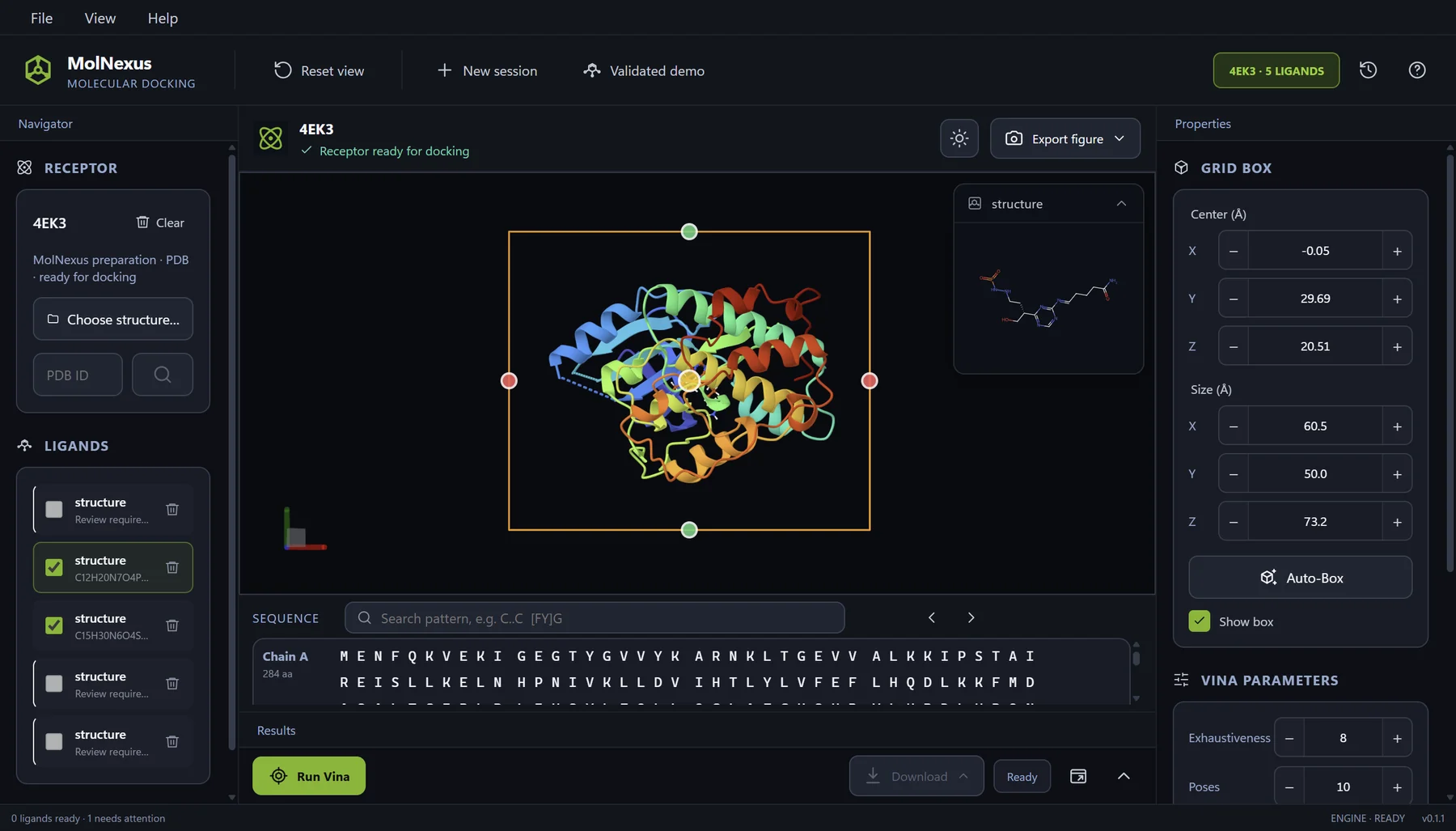
Protocol control
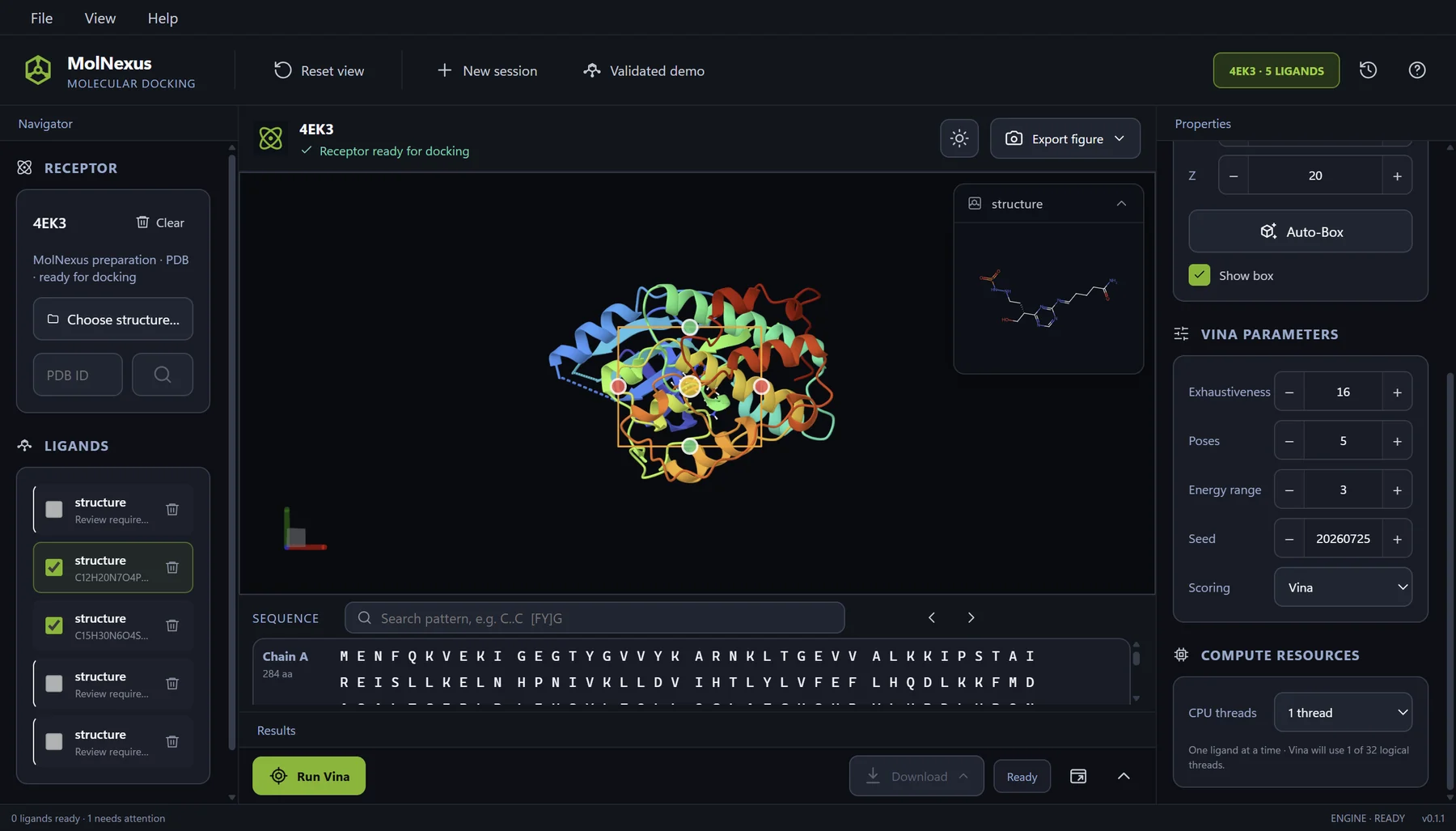
Keep the batch and every consequential parameter visible.
The CDK2 batch is configured with a documented search box, scoring function, exhaustiveness, pose count, energy range, seed, and CPU allocation before execution.
- Two Ready ligand sources selected
- Vina, exhaustiveness 16, seed 20260725
- Search box 24 × 20 × 20 Å
Pose review
Move from the result table to molecular evidence in one view.
Select a row to display its docked pose alongside the receptor and its 2D ligand structure while retaining affinities, RMSD values, sequence, box geometry, and the run configuration.
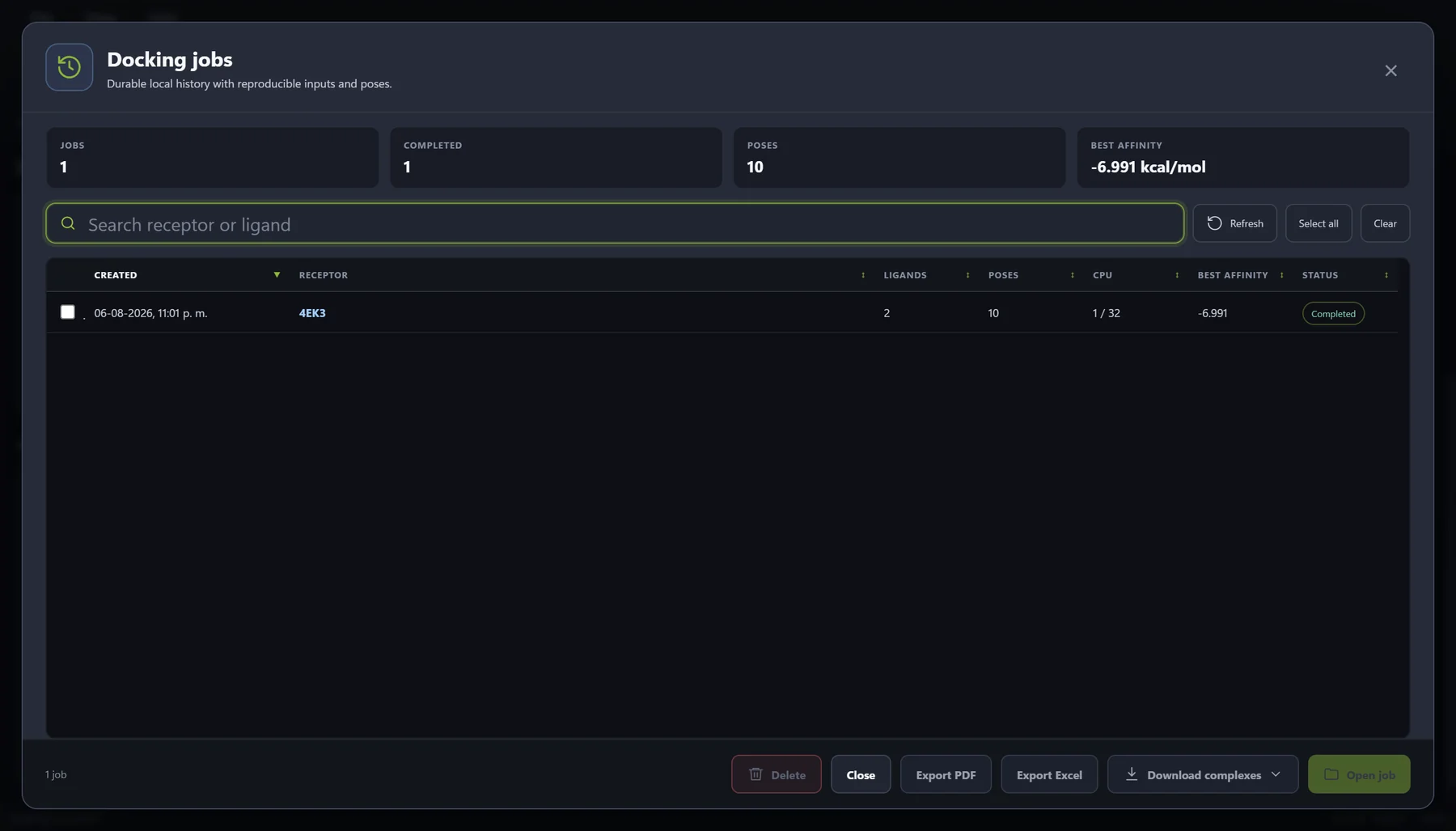
Persistent job history
Reopen, compare, and export completed work.
The completed batch is saved to the local SQLite history with summary metrics, search, multi-row selection, job reopening, PDF and Excel exports, and downloadable docked complexes.
About the displayed values: these runs were configured to validate and present the application workflow. Their docking scores and timings are interface evidence, not a performance benchmark or a biological conclusion.
Built around the scientific task
The controls and context needed to run a docking study.
Integrated molecular view
Inspect the receptor, interaction box, sequence, ligands, and docked poses in an embedded Mol* workspace.
Explicit preparation
Prepare supported receptor and ligand inputs through a defined Meeko and AutoDock Vina boundary.
Configurable docking
Choose Vina or Vinardo scoring, set the interaction box and core run parameters, and keep the configuration beside the structure.
Reviewable outputs
Compare modes, affinity, and RMSD; inspect a selected pose and its protein–ligand interactions in linked 2D and 3D views; then export results, interaction diagrams, and validated complexes.
Product specifications
Know what you receive before purchasing.
The current commercial package is a locally installed Windows desktop application. Scientific results remain on the user's PC unless the user deliberately exports or shares them.
- Application
- MolNexus 0.1.5 · Windows desktop software
- Operating system
- Windows 10 or Windows 11, 64-bit
- Delivery
- Digital installer provided after purchase
- Access
- Installer download after payment · No product key or activation
- Purchase terms
- One Windows PC at a time · Perpetual use of the purchased version
- Updates
- Updates released during the first 12 months are included
- Download and storage
- Approximately 61 MB installer · 2 GB free disk space recommended
- Docking engine
- AutoDock Vina 1.2.7
- Scoring functions
- Vina and Vinardo
- 3D viewer
- Embedded Mol*
- Receptor inputs
- PDB, CIF/mmCIF, or RCSB PDB identifier
- Ligand inputs
- SDF, MOL, MOL2, and PDBQT
- Outputs
- Result tables, CSV data, PDB complexes, and ZIP bundles
- Project continuity
- Local SQLite docking-job history
- Availability
- Available through secure Lemon Squeezy checkout
Scientific use and engine transparency
For research use only.
MolNexus is not intended for clinical diagnosis, medical treatment decisions, patient management, or regulatory use. Users must independently validate scientific inputs, methods, outputs, and conclusions.
MolNexus is an independent commercial desktop application that integrates AutoDock Vina, an open-source molecular docking engine. AutoDock Vina is not owned by or affiliated with BioChemIntelli.
Read Third-Party NoticesCreated and developed by Jorge F. Beltrán, PhD, scientific software developer, AI engineer and computational biologist.
MolNexus
A focused desktop path from structures to docked poses.
Review the workflow examples and system requirements, then purchase MolNexus 0.1.5 and download the Windows installer. Open the workspace without a product key or activation.