How to Keep Molecular Docking Runs Organized Across Receptors, Ligands, and Poses
Loose files and ambiguous names make docking studies difficult to reconstruct. Learn how to connect receptors, ligands, parameters, poses, exports, and persistent job history.
This guide is for researchers who run protein-small-molecule docking often enough that receptors, ligand batches, parameter changes, and pose files have begun to accumulate. The immediate problem is operational: several successful calculations can produce a directory that no longer explains which inputs and settings belong together. The consequence is repeated work, slower review, and uncertainty when a result must be revisited.
Molecular docking software with project or job history can reduce that fragmentation, but only if the underlying record remains understandable. This article provides a practical organization model and shows what to evaluate when deciding whether a persistent docking history would improve your workflow.
The hidden cost of a docking folder that only makes sense today
A single docking test may leave behind only a receptor, one ligand, a configuration file, and an output. Repetition changes the problem. Receptors gain cleaned and protonated variants. Ligands gain alternative states and prepared PDBQT files. Search boxes move. Exhaustiveness and other settings change. Each output contains several poses, and selected poses generate new complexes and reports.
Names such as final.pdbqt,
final_new.pdbqt, and best_pose.pdb cannot carry
that history reliably. The researcher eventually has to infer provenance
from timestamps, folder location, or memory. General guidance for
reproducible computational research instead recommends preserving
intermediate results, recording parameters and software versions, using
stable identifiers, and documenting the exact commands or workflow that
produced each result [1,2].
Start with a job record, not a filename
Minimum record for an organized molecular docking run
| Record layer | What to preserve | Question it should answer |
|---|---|---|
| Job identity | Stable job ID, descriptive name, creation date, completion state, operator or project. | Which calculation is this? |
| Receptor | Source identifier, source file, selected chains or state, preparation decisions, prepared receptor. | Which exact receptor representation was docked? |
| Ligands | Source identity, stereochemistry or state when relevant, prepared input, preparation outcome. | Which molecular entity does each result row represent? |
| Search space | Box center, dimensions, structural rationale, and any visual reference. | Where did the engine search? |
| Execution | Engine and version, scoring method, exhaustiveness, modes, energy range, seed behavior, and other changed settings. | How was the run generated? |
| Results | Ligand-to-pose relationship, affinity, RMSD values, status, output files, and review notes. | Which poses and values belong to each ligand? |
| Exports | Selected tables, complexes, reports, destination, creation time, and purpose. | What left the working record, and why? |
Organize the workflow in five linked layers
1. Preserve receptor identity and state
The receptor name alone is not enough. Record the structure source and identifier, downloaded file, chain selection, biological state, retained cofactors or ions, removed components, hydrogen and protonation decisions, and the prepared docking input. If a structure was predicted, include the model source and the evidence used to accept the binding region.
Keep the unmodified source and prepared receptor as separate objects. That boundary allows a later reviewer to distinguish the coordinates you obtained from the interpretation applied before docking. If you work with predicted receptors, the AlphaFold-to-AutoDock Vina guide explains how to assess that upstream choice.
2. Give every ligand a stable identity
A ligand may appear as a database identifier, SMILES string, SDF record, three-dimensional conformer, protonation state, and PDBQT file. Those are related representations, not interchangeable names. Assign a stable ligand ID before preparation, then preserve the source and prepared forms under that identity.
For batches, record terminal preparation states: completed, failed, or intentionally excluded. A ligand that never reached the engine should not silently disappear from the study. Clear state reporting also prevents a screen of 50 sources from being misreported as 50 completed dockings when only a subset was selected for execution.
3. Store the search box and engine configuration with the job
The search box is part of the scientific question. Save its center and dimensions with the receptor and, when possible, a visual representation or the structural rationale used to place it. A pose cannot be interpreted correctly if the sampled region is unknown.
AutoDock Vina exposes configuration details including the scoring function, receptor and ligand inputs, box center and dimensions, random seed, and pose-writing settings [5-7]. Preserve the engine version and every parameter changed from the chosen protocol. Do not assume that a future installation will use the same defaults.
4. Keep poses attached to ligands and runs
A pose is not an independent result. It belongs to a ligand, receptor, search space, engine configuration, and job. Preserve that relationship when exporting or renaming files. A useful result record includes the mode number, affinity estimate, RMSD bounds reported by Vina, output path, and any review state or note.
Visual review should return from a table row to the corresponding pose in receptor context. This makes it easier to compare modes without confusing two prepared ligand states or two runs that used different boxes. The score remains a property of that protocol, not a portable label that can be detached from it.
5. Treat exports as derived records
Result tables, selected complexes, PDFs, spreadsheets, and ZIP bundles are outputs derived from a particular job. Record the job ID in the export name or metadata and keep the original docking output available. This prevents a presentation-ready file from replacing the computational record that produced it.
Exports should answer a specific next-step need: review a shortlist,
inspect a complex in another application, archive a report, or share a
result table. Avoid creating multiple undocumented copies whose only
difference is a suffix such as new,
fixed, or final2.
A practical directory structure when software history is unavailable
docking-project/
  README.md
  job-register.csv
  00_sources/
    receptors/
    ligands/
  01_prepared/
    receptors/
    ligands/
  02_runs/
    JOB-0001/
      config/
      outputs/
      poses/
      notes.md
  03_exports/
Use a stable ID such as JOB-0001 as the join between the
register, run folder, result table, and export names. A descriptive alias
can remain human-readable:
JOB-0001_1IEP_siteA_batch01. For ligands, use an internal
stable ID plus a recognized source identifier when available:
LIG-002_pubchem-1234.
The register should contain structured columns rather than one long note. Wilson and colleagues recommend unique identifiers, recorded processing steps, meaningful filenames, and a project layout that separates raw data from generated results [2]. The structure above is one workable interpretation for docking; adapt it to the scale and governance of your laboratory.
Why searchable molecular docking job history changes the workflow
Folders store files. A job history stores relationships. It can connect a receptor to multiple ligands, each ligand to several poses, and all of them to one run configuration and completion state. Search can retrieve work by receptor or job identity without requiring the researcher to remember where a directory was placed.
The usefulness of structured virtual-screening storage is not unique to one product. Ringtail, an open-source tool in the AutoDock ecosystem, was developed to store and analyze virtual-screening results in portable SQLite databases [4]. MolNexus is not claimed to use Ringtail; its local history is a separate product implementation. The shared design principle is that relational records can preserve links among docking jobs, ligands, poses, and results more effectively than unrelated filenames.
Loose folders and persistent history solve different problems
| Workflow need | Loose files and folders | Persistent job history |
|---|---|---|
| Store raw and prepared files | Direct and flexible. | Still requires access to the underlying project files. |
| Find a completed run | Depends on location and naming discipline. | Can support search by job or receptor. |
| Connect ligands to poses | Usually inferred from filenames and subfolders. | Can preserve explicit record relationships. |
| Compare job summaries | Often requires opening several files or spreadsheets. | Can expose status, ligand counts, pose counts, affinity summaries, and dates together. |
| Resume review | Requires reconstructing the application state manually. | Can reopen the saved job in its working interface. |
| Backup and long-term stewardship | Requires an external backup and retention plan. | Also requires an external backup and retention plan. |
How MolNexus organizes completed molecular docking jobs
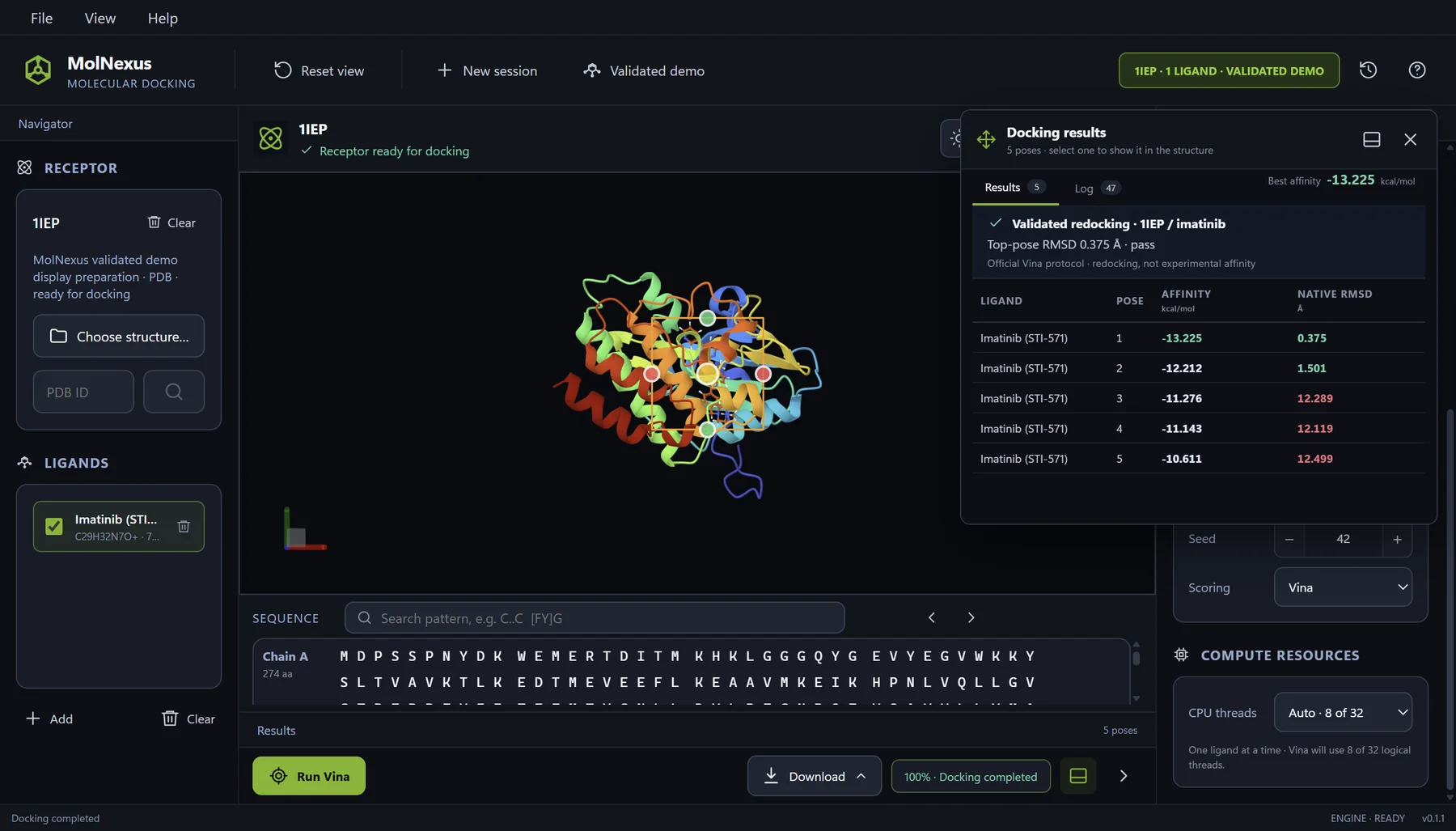
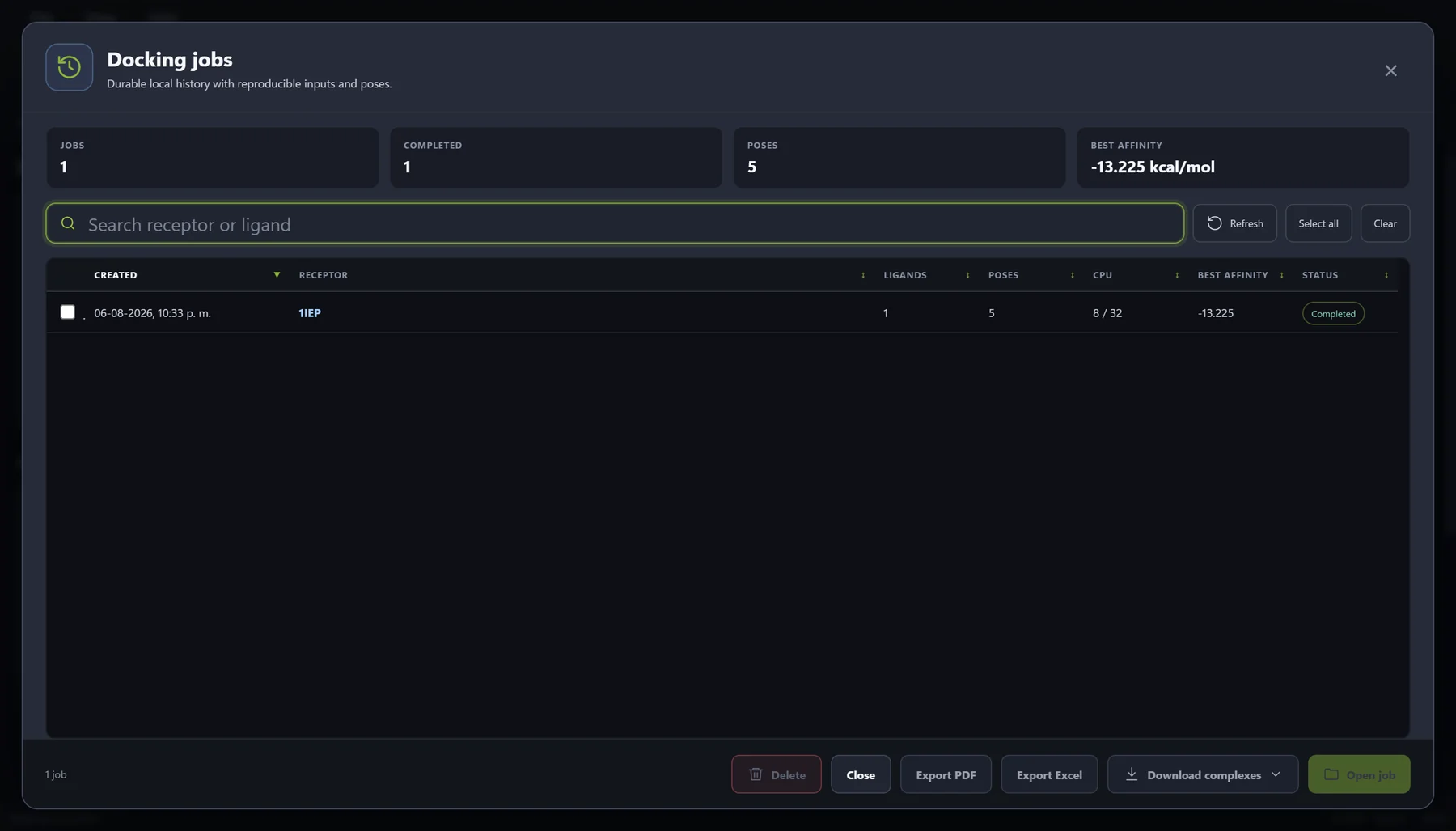
The capture comes from the same documented 1IEP run shown above. One ligand was docked, five poses were retained, and the completed job was saved locally with a best displayed affinity of −13.225 kcal/mol. That value is regression evidence for this frozen case, not a product benchmark or an experimental binding measurement.
The operational outcome is continuity. A researcher can leave the active workspace, find the saved record, and reopen or export the completed job without presenting the history screen as a new scientific calculation. The product centralizes recovery and review around the existing AutoDock Vina output.
Current MolNexus history and product profile
| Product | MolNexus 0.1.1, Windows desktop molecular docking software |
|---|---|
| Supported system | Windows 10 or Windows 11, 64-bit |
| Docking engine | AutoDock Vina 1.2.7 |
| History storage | Local SQLite docking-job history |
| Visible job summary | Job ID, receptor, status, ligand count, best affinity, pose count, and creation time |
| History actions | Search, multi-row selection, job reopening, PDF and Excel exports, and downloadable docked complexes |
| Data location | Scientific results remain on the user's PC unless deliberately exported or shared |
| Purchase and use | US$299 one-time purchase; one Windows PC at a time; perpetual use of the purchased version; 12 months of updates |
| Availability | Available now: MolNexus 0.1.5, US$299 one-time purchase; download after payment, with no product key or activation |
Who benefits most from persistent docking history
Fit and alternative requirements
| Persistent MolNexus history is a practical fit when... | A manual or different system may fit better when... |
|---|---|
| You perform repeated docking work on Windows 10/11, 64-bit. | You need macOS, Linux, or browser-based access. |
| You want completed AutoDock Vina jobs searchable by job or receptor. | You already maintain a disciplined scripted registry that covers your complete workflow. |
| You need to reopen, review, and export jobs without rebuilding the workspace manually. | You perform an isolated one-time calculation and do not need ongoing project continuity. |
| You prefer scientific results and history stored locally on one PC. | Your primary requirement is simultaneous multi-user or cloud collaboration. |
| You value a graphical history integrated with preparation, docking, and pose review. | Your required engine or custom high-performance pipeline lies outside the confirmed product scope. |
A 10-minute audit of your current docking records
- Choose one result from last month. Can you identify its exact receptor source and prepared receptor?
- Trace the selected pose. Can you recover the ligand source, prepared state, mode, score, and output?
- Recover the search space. Can you find the box center, dimensions, and rationale?
- Recover execution settings. Can you identify the engine version and changed parameters?
- Explain the batch. Can you distinguish prepared, selected, completed, failed, and excluded ligands?
- Reopen the work. Can you inspect another pose without recreating the study from scratch?
- Find the exports. Can you connect each spreadsheet, report, or complex to the originating job?
- Check recovery. Is the project included in a tested backup process?
Every uncertain answer identifies a concrete organization requirement. Use those requirements to improve your manual project structure or to evaluate molecular docking software with persistent job history.
Frequently asked questions
Organize the relationships, not only the files
An organized molecular docking run is a chain of evidence: receptor source to prepared receptor, ligand source to prepared ligand, search space and parameters to engine execution, and each result row to its poses and exports. Stable identifiers and a clear directory structure can preserve that chain manually. Persistent job history can make it faster to recover and use.
Start by auditing one older job. If the study is difficult to reconstruct, the problem is already concrete enough to guide your next workflow decision. The goal is not administrative perfection. It is to ensure that completed docking work remains understandable when you need it again.
References
- Sandve GK, Nekrutenko A, Taylor J, Hovig E. Ten Simple Rules for Reproducible Computational Research PLOS Computational Biology 9(10):e1003285 (2013) DOI: 10.1371/journal.pcbi.1003285
- Wilson G, Bryan J, Cranston K, Kitzes J, Nederbragt L, Teal TK. Good enough practices in scientific computing PLOS Computational Biology 13(6):e1005510 (2017) DOI: 10.1371/journal.pcbi.1005510
- Wilkinson MD, Dumontier M, Aalbersberg IJ, et al. The FAIR Guiding Principles for scientific data management and stewardship Scientific Data 3:160018 (2016) DOI: 10.1038/sdata.2016.18
- Hansel-Harris AT, Santos-Martins D, Bruciaferri N, Tillack AF, Holcomb M, Forli S. Ringtail: A Python Tool for Efficient Management and Storage of Virtual Screening Results Journal of Chemical Information and Modeling 63(7):1858-1864 (2023) DOI: 10.1021/acs.jcim.3c00166
- Trott O, Olson AJ. AutoDock Vina: improving the speed and accuracy of docking with a new scoring function, efficient optimization, and multithreading Journal of Computational Chemistry 31(2):455-461 (2010) DOI: 10.1002/jcc.21334
- Eberhardt J, Santos-Martins D, Tillack AF, Forli S. AutoDock Vina 1.2.0: New Docking Methods, Expanded Force Field, and Python Bindings Journal of Chemical Information and Modeling 61(8):3891-3898 (2021) DOI: 10.1021/acs.jcim.1c00203
- Center for Computational Structural Biology. AutoDock Vina Python API Documentation AutoDock Vina documentation Official documentation for configuration, random seed, and pose output parameters.