How to Choose Molecular Docking Software for Reproducible Small-Molecule Screening
A practical buyer guide for researchers evaluating molecular docking software: preparation, search-space control, engine settings, pose review, job history, export, purchase terms, and fit.
This guide is for researchers, laboratory leads, and technical evaluators choosing software for repeated protein-small-molecule docking. The practical problem is rarely a lack of individual tools. It is the fragmentation that appears when receptor preparation, ligand conversion, box definition, engine execution, visualization, spreadsheets, and saved files live in separate places.
That fragmentation becomes expensive in scientific time. A run may be easy to execute once yet difficult to reconstruct weeks later. Parameters can be copied incorrectly, prepared structures can become detached from their sources, and a result table may no longer explain which receptor, ligand state, or search box produced it. The following criteria will help you decide whether a molecular docking application genuinely supports a repeatable screening workflow.
Reproducibility is a product requirement, not a folder name
A reproducible docking study connects an identifiable receptor and ligand set to documented preparation choices, a defined search space, a named engine version, explicit parameters, and preserved outputs. Another researcher should be able to understand what was run and reconstruct the calculation without relying on the operator's memory.
This is different from predictive validity. A perfectly repeatable run can still begin from an unsuitable receptor state or ligand protonation. Reproducibility makes the protocol auditable; target-specific calibration and experimental evidence determine how much confidence the resulting hypotheses deserve. Good software should support that distinction instead of reducing the study to one affinity column.
Seven criteria for choosing molecular docking software
1. Preparation must be visible and reviewable
Docking begins before the engine starts. Receptor preparation determines which chains, waters, cofactors, ions, hydrogens, and residue states reach the calculation. Ligand preparation determines stereochemistry, protonation, tautomers, three-dimensional coordinates, charges, and rotatable bonds. The official Meeko workflow reflects this separation by generating PDBQT inputs for receptors and ligands before AutoDock Vina is executed [3].
Look for software that exposes preparation outcomes and failures. A batch should tell you which ligand sources completed successfully, which did not, and what files were produced. Convenience is valuable, but a preparation step should not become an uninspectable transformation. For a predicted receptor, first evaluate whether the structure is suitable for the binding site; our AlphaFold and protein-small-molecule docking guide covers that upstream decision.
2. The docking engine and parameters must remain explicit
A useful interface should identify the docking engine and version rather than presenting the calculation as a proprietary black box. For AutoDock Vina, the reproducibility record should include the receptor and ligand inputs, scoring function, box center and dimensions, exhaustiveness, number of modes, energy range, random seed when controlled, CPU settings, and output files [1,2].
These settings are not decorative. AutoDock Vina's official tutorial shows the search-box coordinates and exhaustiveness as direct parts of the command, and a benchmark across the PDBbind refined set found that box size and exhaustiveness influenced pose accuracy and computational cost [4]. Choose software that lets you see, record, and deliberately change the parameters relevant to your protocol.
3. Batch screening should preserve ligand identity
Small-molecule screening quickly becomes an information-management problem. Every prepared ligand must remain connected to its source name, preparation result, docking state, poses, and exported structures. Renaming files by hand or copying values between windows creates opportunities for mismatches that are difficult to detect later.
During evaluation, load a representative multi-ligand set rather than a single demonstration molecule. Check whether you can identify the active ligand, observe progress, stop a run deliberately, distinguish completed and failed items, and return from a result row to the correct molecular pose.
4. Pose review must go beyond the best affinity value
AutoDock Vina reports ranked modes with affinity estimates and RMSD bounds relative to the best mode [1]. Those values are useful for navigation, but evaluation also requires molecular context. The software should make it practical to inspect the selected ligand within the receptor, compare alternative modes, recognize steric conflicts, and relate the pose to the intended binding site.
Prefer a workflow in which the table, three-dimensional pose, ligand identity, search box, and run configuration remain visible together. That connection reduces the chance of interpreting a number after its structural context has been lost.
5. Persistent history is part of the scientific record
A completed run should not disappear when the application closes. Searchable history helps researchers recover the receptor, ligand set, completion state, date, summary metrics, settings, and outputs associated with a job. This matters when comparing parameter changes, revisiting a result during manuscript preparation, or explaining a decision to another team member.
The broader FAIR principles emphasize that research objects should be findable, accessible, interoperable, and reusable [5]. Docking software does not satisfy those principles by itself, but stable identifiers, preserved context, and exportable records make later reuse substantially more realistic than a directory of ambiguously named files.
6. Export should support the next scientific step
Ask what leaves the application after a run. At minimum, useful exports may include result tables, docked ligand structures, protein-ligand complexes, engine output, and a human-readable summary. The appropriate formats depend on your downstream analysis, but the data should not be trapped inside a viewer.
Also check whether reopening a job requires rerunning the calculation. A product that can restore the saved result, selected pose, and associated metadata gives the user a cleaner boundary between computation, review, reporting, and downstream analysis.
7. Platform, data location, purchase terms, and support affect fit
Scientific functionality is only one part of a purchase decision. Confirm the supported operating system, hardware requirements, local or cloud execution model, location of project data, purchase scope, update policy, delivery method, and support channel before committing.
A local desktop product can be attractive when a researcher wants work to remain on one computer. A browser platform may be preferable when collaboration from several operating systems is the main requirement. A one-time purchase with ongoing use and a subscription solve different budgeting needs. None of these models is universally superior; the right choice is the one whose boundaries match the actual workflow.
Molecular docking software evaluation checklist
| Evaluation area | What to verify | Why it matters |
|---|---|---|
| Input provenance | Original receptor and ligand identities remain connected to prepared files. | Prevents outputs from becoming detached from their sources. |
| Preparation | Choices, completed items, failures, and generated structures are visible. | Makes pre-docking transformations reviewable. |
| Search space | Box center, dimensions, and structural location can be inspected and recovered. | Preserves the binding-site hypothesis tested by the run. |
| Engine control | Engine version, scoring method, exhaustiveness, modes, energy range, and seed behavior are explicit. | Allows parameter comparison and protocol reconstruction. |
| Batch identity | Each ligand retains its name, status, poses, and result rows. | Reduces mismatches during multi-ligand screening. |
| Pose review | Scores, RMSD values, receptor context, and three-dimensional poses remain connected. | Supports structural interpretation beyond ranking. |
| History | Completed jobs can be searched, reopened, compared, and exported. | Maintains continuity after the active session ends. |
| Commercial fit | Platform, data location, price, purchase terms, updates, and support are stated clearly. | Prevents purchasing a technically capable product that does not fit deployment needs. |
Questions to ask during a real product evaluation
- Can I identify exactly which receptor and prepared ligand produced each pose?
- Can I recover the search-box center and dimensions after closing the project?
- Does the application state the docking engine and version?
- Can I see the parameters that materially affect sampling and output?
- Can I test several ligands without losing their individual preparation and run states?
- Can I inspect alternative poses in the receptor instead of viewing only the best score?
- Can I reopen a completed job without running it again?
- Can I export structures and tables in formats useful outside the product?
- Are the operating system, purchase terms, update period, price, and availability unambiguous?
Use your own representative receptor and ligand set whenever a trial or demonstration permits it. A carefully prepared showcase can prove that the interface works; a representative input set reveals whether the workflow fits your daily research.
Where MolNexus fits
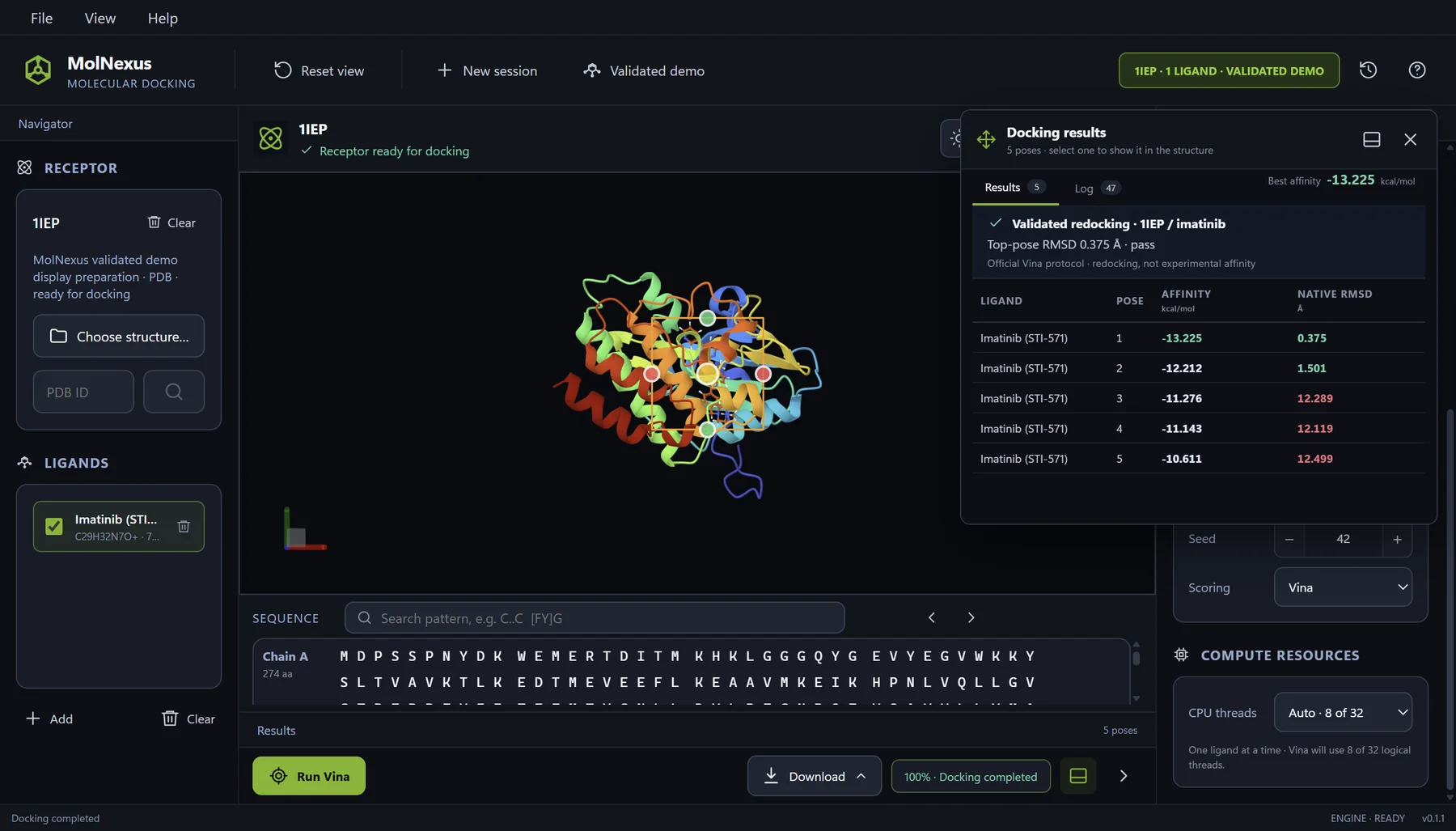
The current MolNexus v0.1.1 interface integrates AutoDock Vina 1.2.7, Meeko preparation boundaries, and an embedded Mol* molecular viewer. Users can compare modes, affinity, and RMSD values; inspect a selected pose with its receptor and ligand; export results or protein-ligand complexes; and recover completed work from a local SQLite job history.
The product page now uses authentic captures from the Tauri development
build at revision 06429bb. The documented examples include a
validated 1IEP/imatinib redocking control and a two-ligand CDK2 batch,
covering preparation, protocol control, execution, pose review, and durable
history without relying on a conceptual mockup.
Current MolNexus product profile
| Product category | Windows desktop molecular docking software |
|---|---|
| Current version | MolNexus 0.1.5 |
| Operating system | Windows 10 or Windows 11, 64-bit |
| Docking engine | AutoDock Vina 1.2.7 |
| Integrated workflow | Receptor and ligand preparation, search-box setup, docking, pose review, history, and export |
| Molecular viewer | Embedded Mol* |
| Project continuity | Local SQLite docking-job history |
| Data location | Scientific results remain on the user's PC unless deliberately exported or shared |
| Purchase and use | One Windows PC at a time; perpetual use of the purchased version; transferable to a replacement PC |
| Price and updates | US$299 one-time purchase; 12 months of product updates included |
| Availability | Available now: MolNexus 0.1.5, US$299 one-time purchase; download after payment, with no product key or activation |
Who MolNexus is designed for
Fit and alternative requirements
| MolNexus is a practical fit when... | Consider a different route when... |
|---|---|
| You use a Windows 10/11 64-bit computer. | Your required desktop platform is macOS or Linux. |
| You want an integrated graphical workflow around AutoDock Vina. | Your primary requirement is a custom command-line or high-performance-computing pipeline. |
| You prepare and review one or many small-molecule ligands against a receptor. | You require a different docking engine or a workflow outside the confirmed product scope. |
| You value local project data, persistent history, and reopenable jobs. | Your team requires browser-based multi-user collaboration. |
| You prefer a one-time purchase with perpetual use of the purchased version. | Your procurement model specifically requires a subscription or an unconfirmed institutional deployment. |
A practical five-minute buying test
- Trace one pose backward. Start from a result row and identify its ligand, prepared input, receptor, box, engine, and settings.
- Trace one job forward. Reopen it, inspect another pose, and export a structure and result table.
- Change one controlled parameter. Confirm that the new run remains distinguishable from the original.
- Review a batch boundary. Check how the application reports completed, failed, and unprocessed ligands.
- Read the commercial terms. Verify platform, price, purchase scope, update policy, delivery, data location, and support.
If the software makes those five actions clear, it is supporting more than execution. It is helping you preserve the chain of decisions that turns a docking run into reviewable computational work.
Frequently asked questions
Choose for the workflow you need to repeat
The best molecular docking software for a research group is not necessarily the application with the longest feature list. It is the one that fits the group's platform and scientific method while keeping inputs, preparation, search space, engine settings, poses, history, and exports connected.
Evaluate the full chain with a representative receptor and ligand set. Look for visible decisions, recoverable jobs, useful exports, and clear commercial boundaries. That approach selects software for reproducible small-molecule screening without confusing interface simplicity with scientific simplicity.
References
- Trott O, Olson AJ. AutoDock Vina: improving the speed and accuracy of docking with a new scoring function, efficient optimization, and multithreading Journal of Computational Chemistry 31(2):455-461 (2010) DOI: 10.1002/jcc.21334
- Eberhardt J, Santos-Martins D, Tillack AF, Forli S. AutoDock Vina 1.2.0: New Docking Methods, Expanded Force Field, and Python Bindings Journal of Chemical Information and Modeling 61(8):3891-3898 (2021) DOI: 10.1021/acs.jcim.1c00203
- Center for Computational Structural Biology. Meeko Basic Docking Documentation Meeko documentation Official preparation and docking workflow for AutoDock Vina and AutoDock-GPU.
- Agarwal R, Smith JC. Speed vs Accuracy: Effect on Ligand Pose Accuracy of Varying Box Size and Exhaustiveness in AutoDock Vina Molecular Informatics 42(2):e2200188 (2023) DOI: 10.1002/minf.202200188
- Wilkinson MD, Dumontier M, Aalbersberg IJ, et al. The FAIR Guiding Principles for scientific data management and stewardship Scientific Data 3:160018 (2016) DOI: 10.1038/sdata.2016.18