Meet Seqqio: 39 Sequence Analysis Tools in One Desktop App
Generate, transform, and analyze biological sequences in one Windows workspace. Explore all 39 tools, native Rust processing, batch capacity, and who Seqqio fits.
A research task rarely ends with one sequence calculation. You may need to extract a region, translate it, inspect the resulting protein, compare a variant, and prepare a reproducible control. Each step can be straightforward. Moving between unrelated interfaces, repeating inputs, and recovering yesterday's settings is where the work becomes cumbersome.
Seqqio is worth considering when those small tasks become a regular part of your day. It is designed for researchers, bioinformaticians, and educators who work with biological sequences on Windows and want direct graphical access to common operations, without writing a script for each task.
This is BioChemIntelli's introduction to its own product. The useful question is not whether every researcher needs another application. It is whether the tasks below occur often enough in your work to justify bringing them together.
Why consider Seqqio for recurring sequence work
One workspace that is easy to navigate
The catalog groups applications under Generate, Transform, and Analyze. You choose a task, provide its inputs and settings, and inspect the result. Light and dark themes, built-in examples, and a consistent interface give you a practical starting point without requiring a command-line workflow.
The value is not simply having 39 icons. It is having related operations close at hand when a question changes from “Which region should I extract?” to “What does it encode?” or “How does this sequence differ from my reference?”

Native Rust processing, without a programming setup
Seqqio's scientific calculations run in a compiled Rust engine. The desktop interface presents the inputs and results; it does not require you to install Python packages or maintain a scripting environment. Rust produces native executables that can run without a Rust development installation, as described in the official Rust documentation.
For supported large workflows, Seqqio streams complete results to files and indexed storage while displaying bounded previews and result pages. That design avoids placing an entire million-record result collection in the interface at once. It provides an architectural basis for efficient processing and manageable result review, not a universal speed guarantee. Runtime still depends on the operation, sequence lengths, settings, processor, memory, and storage.
Batch processing up to one million records, where supported
When the same analysis must be repeated across many sequences, a batch workflow can replace repeated manual submissions. Seqqio preserves record identities so that results remain connected to their original inputs rather than becoming an anonymous list of values.
The headline capacity needs its context. Protein properties, for example, has a one-million-record ceiling alongside independent limits of 256 MiB of input, one billion combined residues, and ten million residues per protein. Whichever applicable limit is reached first governs the run. Other tools also constrain computational work, matches, fragments, or output size. A large record count does not mean arbitrary sequence lengths or every alignment and search configuration will fit.
Local results that remain useful after the calculation
Local sequence processing, saved analysis history, and exports make Seqqio useful beyond the first result screen. Depending on the tool, you can retain sequence outputs, tabular reports, and run settings for downstream work. Supported generators also record seeds and method identities so their synthetic outputs can be reproduced under the same settings.
Local processing does not replace your own backup or data-governance policy. Keep the original inputs and the exported evidence required by your study.
All 39 Seqqio tools and what each does
The following inventory matches the Seqqio 0.1.0 application catalog: 11 Generate tools, 8 Transform tools, and 20 Analyze tools. Names follow the interface. DNA, RNA, and protein support is tool-specific; an alphabet accepted by one application is not automatically accepted by another.
Generate: create synthetic sequences, variants, and fragments
| Tool | What it does |
|---|---|
| Random DNA Sequence | Generates synthetic DNA at fixed or variable lengths, using uniform or custom base weights and a recorded seed. |
| Random Coding DNA | Creates synthetic coding DNA with a start, internal sense codons, and terminal stop under a selected genetic code, plus its translation. |
| Mutate DNA | Introduces DNA substitutions at distinct positions or through repeated mutation events, with optional protected ends. It does not introduce insertions or deletions. |
| Mutate Protein | Introduces amino-acid substitutions into a protein sequence, recording changes and allowing protected ends. It does not predict whether a variant remains functional. |
| Random DNA Regions | Randomizes selected DNA intervals, or protects those intervals while randomizing the rest, preserving the overall sequence length. |
| Random Protein Regions | Randomizes selected protein intervals, or preserves them while changing the remaining residues, for controlled sequence-variation tasks. |
| Sample DNA | Draws bases with replacement using each guide sequence's observed composition. It samples symbols, not FASTA records; composition is matched in expectation. |
| Sample Protein | Draws residues with replacement from each guide protein's observed frequencies. It creates synthetic sequences, not an exact composition-preserving permutation. |
| K-mer Generator | Extracts fixed-length substrings from supplied DNA, RNA, or protein using a chosen step, retaining occurrence coordinates rather than counting unique k-mers. |
| Shuffle Sequence | Randomly reorders symbols within each DNA, RNA, or protein record, preserving length and exact symbol counts, but not codons or motifs. |
| Random protein generator | Generates synthetic proteins from the 20 standard amino acids, with configurable lengths, residue weights, batch counts, and a reproducible seed. |
These tools support different control models. Sampling, shuffling, and independent generation are not interchangeable. For the reasoning behind that choice, see the guide to random protein sequences and reproducible testing. That article also describes a separate BioChemIntelli web utility; its implementation limits are not Seqqio's.
Transform: prepare sequences without losing their boundaries
| Tool | What it does |
|---|---|
| Translation | Translates nucleotide input using a selected NCBI genetic code, reading frame, and strand. An integrated Translation Map provides a six-frame DNA view. |
| Reverse complement | Reverses, complements, or reverse-complements nucleotide input. This application normalizes U to T and returns uppercase DNA-alphabet output. |
| Range Extractor | Extracts specified positions or ranges from DNA, RNA, or protein, with options for joined or separate subsequences. |
| Window Extractor DNA/RNA | Extracts a fixed-size window relative to a selected nucleotide position, with orientation and context-highlighting options. The complete window must fit. |
| Window Extractor Protein | Extracts a fixed-size residue window, or highlights it within the protein, while preserving N-terminal to C-terminal order. |
| Split Codons | Separates nucleotide symbols into sequences for the first, second, and third codon positions. It partitions positions rather than translating or inferring the reading frame. |
| Split FASTA | Divides each sequence into coordinate-aware fragments of a chosen maximum length, with optional overlap and shorter terminal fragments. |
| Merge FASTA | Combines multiple FASTA files into one ordered document while retaining separate records. It does not concatenate their biological sequences or remove duplicates. |
Frame, strand, and genetic code are scientific choices, not formatting preferences. The NCBI genetic-code reference documents different codon assignments and initiators. Choose the applicable code and respect each Seqqio tool's supported-code policy rather than assuming every translation-related view has identical scope.
Analyze: compare sequences and inspect alignments
| Tool | What it does |
|---|---|
| Alignment Viewer | Opens existing aligned DNA or protein FASTA for inspection, with consensus and applicable protein-conservation annotations. It does not calculate a multiple sequence alignment. |
| Pairwise Align DNA | Calculates global or local pairwise DNA alignments with nucleotide substitution scores and affine gap costs, for individual pairs or supported batch pairings. |
| Pairwise Align Protein | Calculates global or local protein alignments using BLOSUM62 and configurable affine gap costs, preserving pair identities and source coordinates. |
If choosing between end-to-end and regional comparison is the difficult part, start with the global alignment guide or the local protein alignment guide. Those methodological discussions complement this catalog; an alignment score alone does not establish biological function.
Analyze: describe sequence composition, patterns, and coding features
| Tool | What it does |
|---|---|
| DNA Molecular Weight | Calculates sequence-derived DNA mass under explicit strand, topology, and mass conventions, reporting a range when supported ambiguous bases prevent one exact value. |
| DNA Pattern Find | Finds IUPAC motifs or bounded regular expressions in DNA, with strand, overlap, and ambiguity policies and coordinates for matching regions. |
| DNA Stats | Reports per-record nucleotide composition, GC measures, ambiguities, gaps, and adjacent dinucleotide counts, keeping known-base statistics separate from ambiguity-based estimates. |
| ORF Finder | Finds complete start-to-stop open reading frames under selected code, strand, frame, and start policies, returning nucleotide and protein sequences. |
| Protein properties | Calculates molecular weight, theoretical pI, GRAVY, instability and aliphatic indices, extinction coefficients, amino-acid composition, and residue groups for unmodified protein sequences. |
| Protein Pattern Find | Searches standard amino-acid sequences for literal motifs or bounded regular expressions, returning match coordinates and coverage without inferring domains or function. |
| Codon Usage | Counts codons in DNA or RNA and reports frequencies, synonymous-family fractions, coding GC, and GC by codon position. It is not codon optimization. |
| Codon Plot | Plots codons in sequence order against a supplied codon-frequency reference. Bar values describe that reference, not measured expression or translation speed. |
| CpG Islands | Screens DNA windows using GC and observed/expected CpG thresholds, then groups qualifying windows into regions. It does not establish methylation or promoter activity. |
Analyze: inspect primers, restriction sites, and sequence-design options
| Tool | What it does |
|---|---|
| Primer Map | Maps a named primer list against DNA targets in both orientations, including supported circular targets. It locates binding sites rather than predicting PCR products. |
| PCR Products | Predicts sequence products from a supplied primer pair and DNA templates under an exact-binding model, reporting product sequences, lengths, and coordinates. |
| Restriction Digest | Models complete digestion of linear or circular double-stranded DNA with selected enzymes, reporting fragments, cut coordinates, and end descriptions. |
| Restriction Summary | Summarizes recognition and modeled cleavage for selected enzymes, distinguishing zero, unique, multiple, and unassessable cutters without constructing combined digestion products. |
| Fuzzy Search DNA | Finds approximate DNA matches using either substitution-only Hamming distance or an edit-distance model that also allows insertions and deletions. |
| Reverse Translate | Produces concrete or degenerate DNA representations of a protein using a selected genetic code and codon-weight reference, with representation-specific diagnostics. |
| Mutate for Digest | Proposes synonymous substitutions that introduce a selected restriction site within an explicitly defined coding region, rechecking translation and selected-enzyme site changes. |
| PCR Primer Stats | Calculates individual DNA-primer length, GC, mass, and melting-temperature estimates under stated conditions, with structural screens. It does not design primers or certify PCR suitability. |
These eight tools answer related but different questions. A mapped binding site, a predicted amplicon, a calculated melting temperature, and a modeled restriction fragment are not equivalent evidence of experimental success.
A practical way to use the collection
Consider a hypothetical researcher comparing several protein constructs. The task could start with Range Extractor to define consistent boundaries, continue with Protein properties to compare sequence-derived descriptors, and use Pairwise Align Protein to inspect the differences. If synthetic controls are relevant, Shuffle Sequence preserves exact composition, while Sample Protein provides a different, frequency-based sampling model.
Those are explicit steps chosen by the researcher, not a claim that Seqqio automatically connects every application into a pipeline. Keep the original records, export the required outputs, and document which settings and control model answer the scientific question.
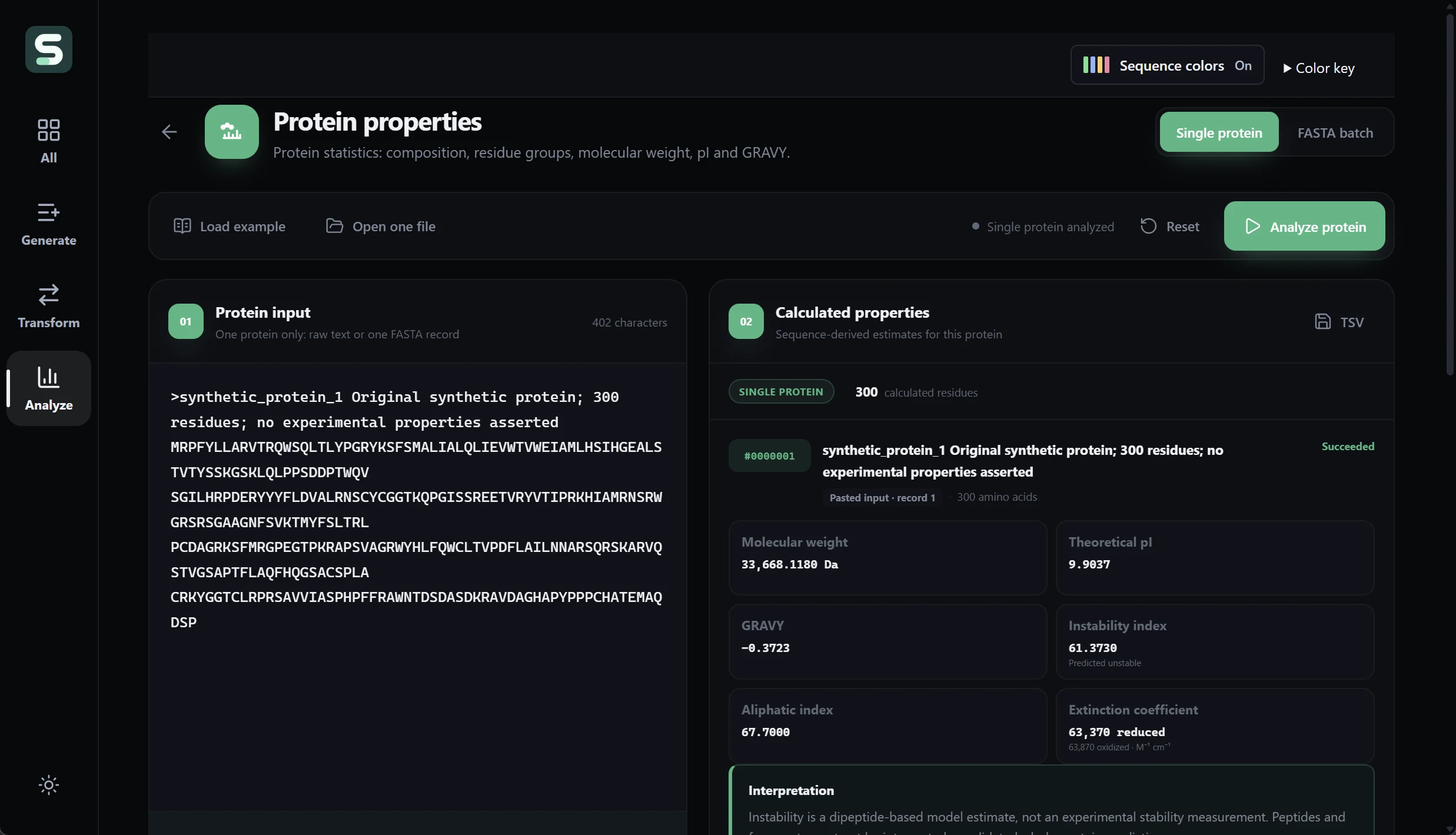
For a deeper explanation of mass, theoretical pI, and extinction coefficients, use the protein-property interpretation guide. It discusses the separate ProteoCalc web application; do not assume identical formulas, accepted alphabets, or limits across different products.
When Seqqio is worth adding, and when it may not be
Seqqio is a strong candidate for your shortlist if several of these operations recur in your work, you prefer a graphical Windows application, and you want supported batches and saved results in the same environment. You do not have to use all 39 tools to benefit from having the right few readily available.
It may add less value if an existing validated script already handles your exact workload reliably, or if you only need an occasional calculation available through a free utility. It is not a replacement for a dedicated read-mapping pipeline, genome-scale analysis system, multiple-alignment engine, or institution-wide collaboration platform. The current purchase supplies a Windows 64-bit installer, not a macOS or Linux build.
Before buying, identify two or three tasks you actually repeat. Check their accepted inputs, outputs, and workload limits against your data. Then ask whether consolidating those tasks is worth US$79 once to you. That is a more useful value test than counting features or assuming that a larger toolkit automatically produces better research.
Bring the sequence tasks you repeat into one workspace
The reason to consider Seqqio is practical: common sequence work deserves software that is straightforward to open, navigate, run, and revisit. Its 39 applications, native Rust processing, supported large batches, and modern light and dark interfaces put that idea into a desktop tool you can evaluate against your own research needs.
References
- The Rust Project. Hello, World! — Compilation and Execution The Rust Programming Language Compilation and Execution: ahead-of-time binary delivery; not Seqqio throughput or scientific validation
- Andrzej Elzanowski and Jim Ostell; NCBI. The Genetic Codes National Center for Biotechnology Information Introduction, transl_table selection and documented code tables; not validation of Seqqio