Is an AutoDock Vina GUI Worth Paying For? A Practical Workflow Comparison
AutoDock Vina is open-source, so what makes a paid GUI worth considering? Compare automation, preparation, box control, pose review, history, product fit, and real workflow value.
This comparison is for researchers, technical evaluators, principal investigators, and laboratory teams choosing how to run repeated protein–small-molecule docking studies. It is not asking whether the Vina engine needs a commercial license. The official AutoDock Vina project is distributed under the Apache License 2.0 and can be used directly from precompiled executables, source, or Python bindings [1,2].
The purchasing question is narrower: does a desktop workflow around that engine solve a recurring problem that scripts and separate tools do not solve efficiently for this particular user? The answer can be yes for one laboratory and no for another.
What the AutoDock Vina command line already gives you
AutoDock Vina is not a limited trial that becomes useful only after purchasing a graphical layer. Its official project provides the docking engine, documented command-line options, Python bindings, multiple scoring functions, and batch-docking capabilities [1]. The basic tutorial shows an explicit configuration built from receptor and ligand files, a three-dimensional box center and size, exhaustiveness, and output paths [3]. The batch tutorial documents sequential docking of multiple ligands and command-line patterns for multiple receptors [4].
Input preparation is also available through the open-source Meeko toolkit. Meeko exposes command-line and Python interfaces for preparing receptor and ligand inputs and processing AutoDock output [5]. Its ligand-preparation documentation makes important chemical assumptions visible: input molecules need appropriate hydrogens and three-dimensional coordinates before PDBQT generation [6].
Capabilities that do not require a paid GUI
| Need | Available in the open-source workflow | What the user must organize |
|---|---|---|
| Run docking | Vina executable or Python bindings [1,2]. | Environment, paths, commands, logs, and outputs. |
| Define the search space | Explicit center and size values in a configuration file or command [3]. | How the box was selected and how its values are retained. |
| Prepare inputs | Meeko command-line or Python tooling [5,6]. | Source structures, chemistry decisions, versions, and prepared files. |
| Dock a collection | Batch options and shell or workflow scripts [4]. | Naming, failures, restarts, parallelization, and result aggregation. |
| Build a custom pipeline | Composable executables, files, and Python APIs [1]. | Development, testing, documentation, maintenance, and onboarding. |
If Vina is free, what would you actually pay for?
You would be paying for the product layer around the engine: a coherent path from source structures to a reviewable and recoverable docking record. That layer can include guided preparation, visible box placement, parameter controls, molecular visualization, pose inspection, persistent job history, exports, installer packaging, updates, and product support. Its value is operational rather than algorithmic.
MolNexus, for example, is a local Windows desktop application built around AutoDock Vina 1.2.7. Its current interface combines receptor and ligand preparation, interaction-box definition, Vina or Vinardo settings, local docking, Mol* pose review, local SQLite history, and export in one workflow. The engine remains AutoDock Vina; the commercial product is the integrated desktop experience surrounding it.
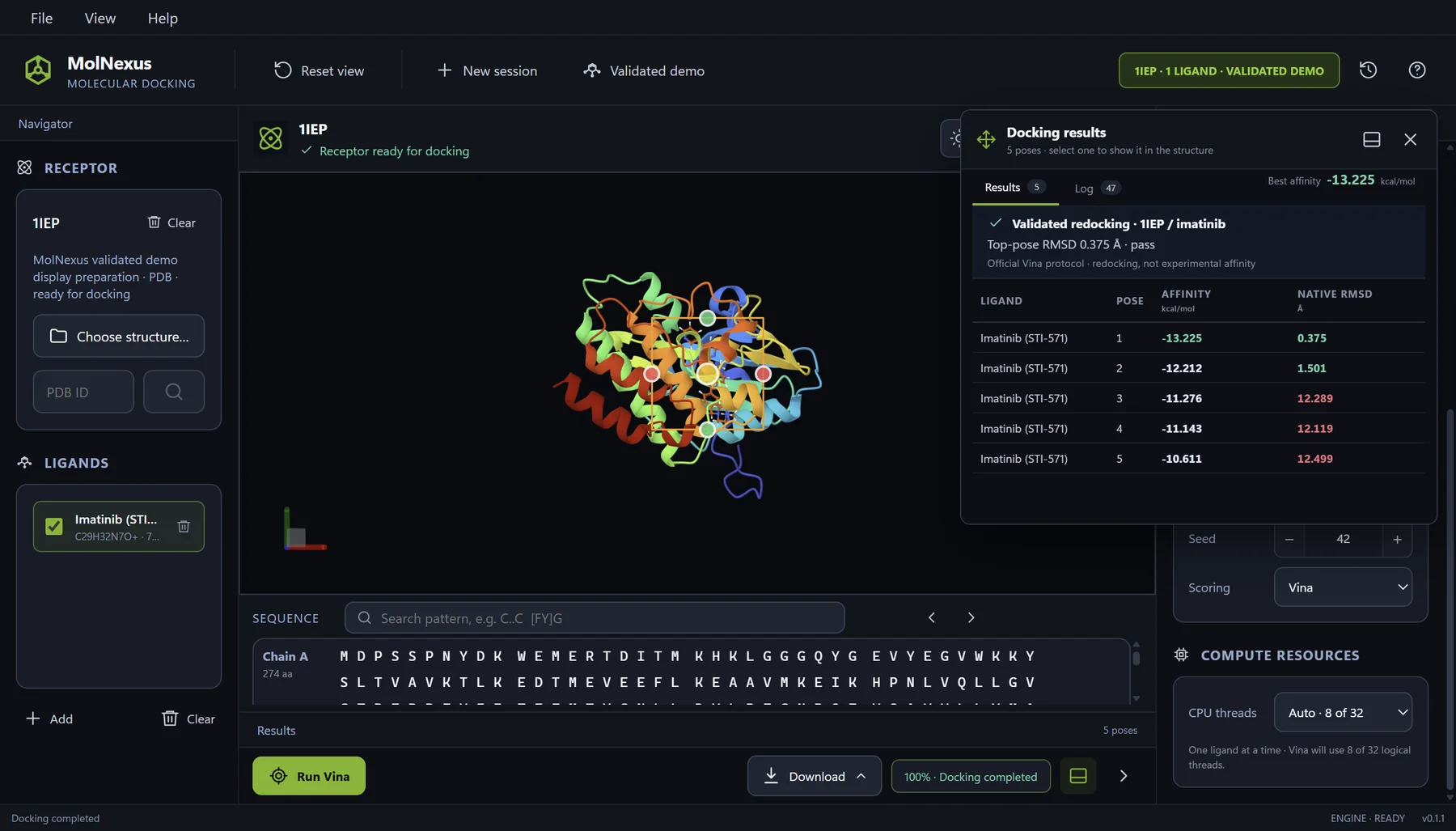
The paid layer in practical terms
| Product layer | Potential value | What it does not guarantee |
|---|---|---|
| Integrated preparation | Fewer handoffs between tools and clearer input state. | Correct protonation, tautomer selection, or receptor choice. |
| Visual box definition | Direct spatial inspection of center and dimensions. | A biologically appropriate binding site. |
| Pose viewer | Faster inspection of orientations and ranked outputs. | A validated binding mode or experimental affinity. |
| Saved history | Reopen completed work without reconstructing a folder manually. | Reproducibility if the underlying inputs and assumptions are poor. |
| Installer, updates, and support | Lower setup and maintenance burden for the intended desktop user. | Suitability for every operating system or compute environment. |
AutoDock Vina GUI vs command line
Workflow comparison
| Criterion | Command line | Integrated desktop GUI |
|---|---|---|
| Engine access | Direct access to the open-source Vina executable or API. | Access to the same engine through product controls. |
| Automation | Excellent for scripts, schedulers, containers, and custom pipelines. | Usually optimized for interactive local work rather than headless orchestration. |
| Preparation | Flexible, but often distributed across commands, scripts, and files. | Can keep preparation state and subsequent docking steps together. |
| Search-space control | Precise numerical configuration; visualization requires an additional viewer or process. | Can connect numerical box controls directly to the molecular scene. |
| Pose review | Outputs can be inspected with a separate viewer or custom analysis. | Can place ranked outputs and three-dimensional inspection in the same session. |
| Record keeping | Potentially excellent when the team versions inputs, configurations, commands, logs, and outputs rigorously. | Can provide an application-level job history and reopen path. |
| Onboarding | Requires command-line, environment, file, and protocol knowledge. | Can reduce interface learning while leaving scientific training necessary. |
| Best fit | Developers, computational specialists, automated screens, clusters, and custom infrastructure. | Scientists who value an interactive, visible, local, end-to-end desktop workflow. |
The command line is not inherently irreproducible. A version-controlled repository containing exact inputs, environment definitions, configuration files, commands, seeds, logs, and analysis code can be exceptionally transparent. Conversely, a GUI is not reproducible merely because it saves a job. The relevant question is which method helps the intended team preserve the complete protocol consistently.
This is also why “easy to use” should not be treated as “for beginners.” Experienced researchers may prefer a visual workspace for interactive decisions and still use scripts for downstream analysis. Interface preference and scientific competence are separate dimensions.
Seven questions to decide whether a GUI is worth paying for
| Question | A paid GUI becomes more plausible when… | The command line remains stronger when… |
|---|---|---|
| 1. Where is time being lost? | Users repeatedly move among preparation, box definition, viewing, and result folders. | The workflow is already scripted, tested, and maintained. |
| 2. How often is the workflow repeated? | The same operational sequence recurs across projects or users. | Docking is occasional and the existing setup is sufficient. |
| 3. Is box placement an interactive decision? | Researchers benefit from seeing the receptor and search space together. | Box coordinates are generated and validated automatically. |
| 4. How are poses reviewed? | Users need rapid visual movement between ranked poses and context. | Pose analysis is already handled by custom scripts or another established viewer. |
| 5. What happens a month later? | Reopening a run and understanding its context is currently difficult. | Versioned project directories already provide reliable provenance and recovery. |
| 6. What scale is required? | Interactive local screening and review are the main use case. | Headless, distributed, cluster, or very large automated workloads dominate. |
| 7. Who maintains the workflow? | The team values an installer, product updates, documentation, and direct support. | The team has the engineering capacity and preference to own the full stack. |
When the command line is the better choice
| Situation | Why the command line fits |
|---|---|
| Automated high-throughput pipeline | Commands and APIs integrate naturally with schedulers, containers, tests, and data pipelines. |
| Linux, macOS, remote server, or cluster requirement | A Windows-only desktop product would not match the operating environment. |
| Custom scientific methods | The team can replace, extend, or instrument individual steps directly. |
| Mature internal workflow | Existing scripts, documentation, validation, and provenance may already solve the operational problem. |
| Budget is the binding constraint | The open-source stack remains capable when the team can supply the required time and expertise. |
When a desktop GUI can earn its price
| Recurring problem | Value to look for |
|---|---|
| Fragmented preparation and docking steps | One visible path that preserves the state of receptor, ligands, box, and parameters. |
| Search-space mistakes or uncertainty | Numerical controls connected to a three-dimensional molecular view. |
| Slow pose triage | Ranked outputs, molecular context, and export without repeated format switching. |
| Lost or ambiguous prior runs | Persistent history with clear reopen, search, selection, and export behavior. |
| Setup and onboarding burden | A maintained installer and a product interface that reduces environment assembly. |
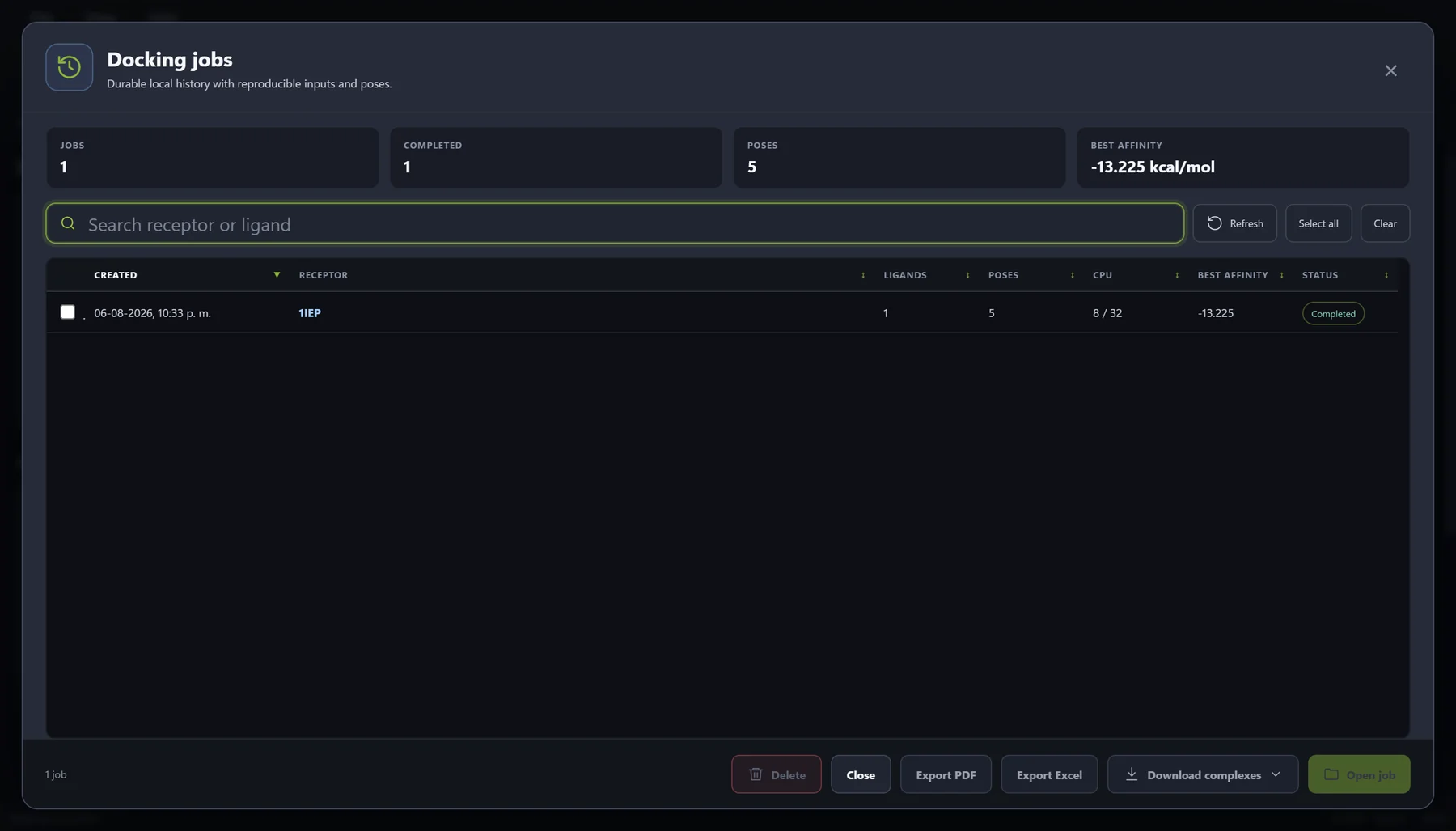
History is a useful example of the distinction between engine and product. AutoDock Vina produces docking output; it does not prescribe one laboratory-wide system for naming, searching, reopening, and exporting every completed project. A team can build that system itself. A desktop product can also provide it as part of the purchase.
If this is the dominant pain in your laboratory, the guide to keeping molecular docking runs organized gives a deeper record model for receptors, ligands, parameters, poses, and exports.
How to evaluate price without inventing ROI
Build a local value case
| Measure in your current workflow | Evidence to collect |
|---|---|
| Setup burden | Steps, dependencies, failure points, and staff time needed to create a working environment. |
| Per-project handoffs | How often users switch tools, convert formats, copy parameters, or reconstruct context. |
| Recovery cost | How often past work cannot be reopened or explained without manual investigation. |
| Review burden | Time and tools required to connect ranked outputs with three-dimensional pose inspection. |
| Maintenance ownership | Who resolves dependency, packaging, documentation, and update problems. |
| Fit penalties | Costs created by an unsupported operating system, missing automation, or restrictive licensing. |
Current MolNexus product profile
| Product | MolNexus 0.1.1, Windows desktop molecular docking software. |
|---|---|
| Docking engine | AutoDock Vina 1.2.7, with Vina and Vinardo scoring selections [7]. |
| Inputs | Receptors from PDB, CIF/mmCIF, or an RCSB PDB identifier; ligands from SDF, MOL, MOL2, or PDBQT. |
| Workflow | Preparation, interaction-box definition, docking parameters, local execution, Mol* pose review, local SQLite history, and export. |
| Environment | Windows 10/11, 64-bit. Inputs, outputs, and job history remain on the PC unless the user exports or shares them. |
| Purchase and use | US$299 one-time purchase; one Windows PC at a time; perpetual use of the purchased version; transferable to a replacement PC after removal from the previous device. |
| Updates | 12 months of product updates included. |
| Availability | Available now: MolNexus 0.1.5, US$299 one-time purchase; download after payment, with no product key or activation. |
MolNexus fit and non-fit
| Good fit | Not the intended fit |
|---|---|
| A researcher wants an interactive local Windows workflow around Vina. | The required environment is macOS, Linux, a remote server, or a cluster. |
| Preparation, box definition, pose review, and history need to stay connected. | The team needs a headless API or distributed orchestration as the primary interface. |
| Use on one Windows PC at a time matches the intended user. | Concurrent multi-seat, enterprise, or institution-wide deployment is required. |
| A one-time purchase with ongoing use is preferred over a subscription. | The buyer only needs the free engine and already owns the surrounding workflow. |
Buyer checklist before choosing any AutoDock Vina GUI
| Verify before purchase | Done? |
|---|---|
| The exact Vina version and supported scoring functions are disclosed. | □ |
| Preparation assumptions and accepted input formats match the project. | □ |
| Search-box center and dimensions are visible and retainable. | □ |
| Exhaustiveness, modes, energy range, seed, and other relevant settings are controllable. | □ |
| Poses can be inspected and exported without obscuring the original files. | □ |
| Job history, reopening, failure handling, and export behavior are demonstrated with authentic captures. | □ |
| Operating system, device limit, delivery, updates, support, and current availability are explicit. | □ |
| The product solves a measured workflow problem rather than promising better science from appearance alone. | □ |
Frequently asked questions
The right comparison is not “free engine versus paid engine.” It is “build and maintain the surrounding workflow yourself versus purchase a workflow that already matches your work.” AutoDock Vina's command line remains a strong, transparent choice. A well-designed GUI becomes commercially defensible when it makes repeated scientific work easier to inspect, recover, and communicate without hiding the parameters that matter.
For a broader evaluation across preparation, protocol control, pose review, history, export, purchase terms, and product fit, use the molecular docking software buyer guide. To compare the two scoring selections available in MolNexus, see Vina vs Vinardo.
References
- Center for Computational Structural Biology. AutoDock Vina source repository GitHub Official source repository documenting the Apache License 2.0, Python bindings, scoring functions, and batch features.
- Center for Computational Structural Biology. Installation AutoDock Vina documentation Official installation documentation for precompiled executables, source builds, and Python bindings.
- Center for Computational Structural Biology. Basic docking AutoDock Vina documentation Official tutorial documenting receptor, ligand, search-space, configuration, exhaustiveness, and output inputs.
- Center for Computational Structural Biology. Docking in batch mode AutoDock Vina documentation Official documentation for sequential ligand batches, output directories, and multi-receptor command-line patterns.
- Forli Lab. Meeko source repository GitHub Official Meeko repository documenting AutoDock input preparation, output processing, and command-line and Python interfaces.
- Forli Lab. Basic ligand preparation Meeko documentation Official documentation for ligand-to-PDBQT preparation and its hydrogen and three-dimensional coordinate requirements.
- Center for Computational Structural Biology. AutoDock Vina 1.2.7 release GitHub Releases (2025) Official release record for the engine version bundled with MolNexus 0.1.0.