AutoDock Vina Batch Docking: How to Screen a Ligand Library Without Losing Traceability
Screen multiple ligands without losing the scientific record. Preserve stable identities, one frozen Vina protocol, failures, ranked poses, exports, and local job history across the batch.
The official AutoDock Vina documentation defines batch mode as
docking ligands one after another and exposes the
--batch and --dir options for that
purpose [1]. This is different from simultaneous multiple-ligand
docking, where more than one ligand participates in the same
docking calculation [2]. Both capabilities exist, but they answer
different scientific questions.
This guide concerns the common virtual-screening situation: one prepared receptor, one frozen search protocol, and a library of independent small molecules that must remain identifiable from import through pose review.
Batch docking and simultaneous multiple-ligand docking are different
Three AutoDock Vina execution patterns
| Pattern | What enters one calculation | Typical purpose | Traceability unit |
|---|---|---|---|
| Single-ligand docking | One receptor and one ligand | Protocol development, redocking, or troubleshooting | One receptor-ligand run |
| Batch docking | One receptor and one ligand at a time, repeated sequentially | Screening a set or library of independent ligands | One batch plus one result record per ligand |
| Simultaneous multiple-ligand docking | One receptor and several ligands in the same calculation | Questions such as compatible fragment placement or co-binding | One combined multi-ligand result |
The batch is a data relationship, not just a folder
A directory containing prepared ligands and Vina outputs may be enough to start a calculation, but it does not automatically preserve the scientific record. Filenames can collide, one SDF may contain several records, failed molecules can disappear from the output directory, and a rerun may silently use a different box or seed.
The screening denominator therefore begins with every submitted source record, not only the ligands that produced a score. A defensible summary distinguishes at least: received, rejected at import, held during preparation review, eligible for docking, attempted, completed, failed, cancelled, and retained for pose review.
Minimum record for a traceable ligand-screening batch
| Layer | What to retain | Question it answers later |
|---|---|---|
| Study | Target, decision question, protocol identifier, and date | Why was this batch run? |
| Receptor | Source, biological state, preparation decisions, prepared artifact, and hash | Which exact receptor did every ligand encounter? |
| Ligand | Stable ID, source record, input hash, chemical-state policy, preparation outcome, and PDBQT artifact | Which submitted molecule does this result represent? |
| Protocol | Box, scoring function, exhaustiveness, modes, energy range, seed, CPU allocation, and engine identity | Were all eligible ligands evaluated consistently? |
| Outcome | Start and end time, terminal status, error, pose artifacts, and log | What happened to every eligible ligand? |
| Review and export | Selected pose, selection rationale, annotations, export type, and derived artifact | How did a generated result become a retained candidate? |
A reproducible AutoDock Vina batch-docking workflow
1. Validate the protocol before scaling it
Batch execution multiplies a protocol; it does not validate it. Establish the receptor state, binding-site rationale, preparation policy, scoring function, search box, and decision rule before the production library is exposed to them. Use target-relevant controls where available and keep pose recovery separate from screening discrimination.
The detailed molecular docking workflow validation guide covers redocking, controls, enrichment, robustness, and a defensible go/no-go decision. The AutoDock Vina grid-box guide explains how to document center, size, and exhaustiveness before they become batch-wide settings.
2. Assign stable ligand identities before preparation
Do not wait for PDBQT filenames to become the identifiers. Give each submitted molecular record a stable internal ID while its original source filename, record index, external identifier, and checksum are still available. If one SDF contains several molecules, each record needs its own row. Meeko explicitly supports SD files with multiple molecules and can write separate PDBQT files for them [5].
Keep the scientific identity separate from the display name. Two ligands may share a title, and the same compound may be intentionally represented by several protonation, tautomeric, or stereochemical states. The batch manifest must be able to express both situations without overwriting a result.
A practical ligand manifest
| Field | Example form | Why it matters |
|---|---|---|
| Ligand ID | LIB-A-000127 |
Stable key across preparation, docking, review, and export. |
| Source locator | File, archive, dataset record, and SDF record index | Connects the result to the submitted molecule. |
| Source hash | SHA-256 of the retained source artifact | Detects an input change hidden behind the same filename. |
| Chemical state | Protonation, tautomer, stereochemistry, fragments, and charge policy | Distinguishes deliberate states from accidental duplicates. |
| Preparation outcome | Ready, review required, or excluded, with reason | Preserves the denominator before docking starts. |
| Prepared artifact | PDBQT identity, preparation tool versions, settings, and hash | Links the scientific record to the exact Vina input. |
3. Preflight every source and preserve terminal states
Preparation failures are part of the screening result. Parse the intended record, resolve its chemical graph and docking state, generate a usable 3D structure when needed, and verify the PDBQT before marking it eligible. Meeko's current ligand-preparation documentation requires explicit hydrogens and 3D coordinates for its ordinary input path [5].
The SDF preflight checklist separates record integrity, chemical graph, docking state, and prepared-artifact checks. The broader protein and ligand preparation guide explains how those decisions fit around the receptor and ligand workflow.
4. Freeze one explicit docking protocol
Use the same prepared receptor, box, scoring function, search settings, and reporting rule for every ligand that belongs to one comparison. The official Vina tutorial shows a configuration file for the box and explains that higher exhaustiveness increases the computational effort used by the search [3]. The Vina FAQ further explains that exhaustiveness controls the number of independent search runs and that larger search spaces can require more effort and longer execution [4].
Record the random seed. Vina's search is stochastic, and its documentation states that the same seed, inputs, and parameters are required for exact reruns [4]. A fixed seed supports replay; it does not by itself demonstrate robustness. If the validation plan requires repeated seeds, define those repeats before looking at the production ranking and treat each repeat as a linked run.
center_x = 15.190
center_y = 53.903
center_z = 16.917
size_x = 20
size_y = 20
size_z = 20
scoring = vina
exhaustiveness = 16
num_modes = 9
energy_range = 3
seed = 202608075. Pilot the pipeline before committing the full library
Run a small, prespecified pilot that spans the chemistry and flexibility expected in the library. The purpose is operational: verify input parsing, preparation evidence, box containment, runtime behavior, output naming, failure capture, pose parsing, and export. It is not permission to select parameters that make the pilot compounds look favorable.
If the pilot reveals a protocol defect, correct and revalidate the protocol, assign a new version, and restart the comparison. Do not merge results from incompatible protocol versions into one ranking without a justified harmonization method.
6. Run ligands sequentially with deterministic output mapping
AutoDock Vina's command-line batch mode accepts repeated
--batch arguments and writes outputs beneath the
directory supplied with --dir [1]. The documentation
adds an index when duplicate ligand filenames would collide [1].
That prevents one overwrite, but it does not replace the manifest:
an indexed filename still needs to map back to a stable ligand ID
and source record.
vina --receptor receptor.pdbqt \
  --batch ligands/LIB-A-000001.pdbqt \
  --batch ligands/LIB-A-000002.pdbqt \
  --batch ligands/LIB-A-000003.pdbqt \
  --config config.txt \
--dir poses7. Record failures without shrinking the denominator
Terminal states that should remain visible
| State | Meaning | Required record |
|---|---|---|
| Rejected at import | The submitted record could not become a stable molecular input. | Source locator and parser error. |
| Held for review | A chemical or preparation decision remains unresolved. | Diagnostic, proposed options, and final human decision. |
| Excluded | The ligand is outside the current protocol or could not be prepared defensibly. | Exclusion reason and protocol version. |
| Docking failed | Vina started or was invoked but no accepted pose result was retained. | Exit state, error, log, and any partial artifact. |
| Cancelled | The operator stopped the job. | Cancellation time and completed work retained before the stop. |
| Completed | A parseable result was produced under the frozen protocol. | All poses, scores, output artifact, and log. |
Report counts at each gate. A statement such as "100 submitted, 87 eligible, 84 completed, and 3 docking failures" is only an illustrative reporting pattern, not a result from this article. The important point is that the three failures and thirteen pre-docking exclusions remain visible rather than disappearing from an 84-row score table.
8. Review poses before ranking compounds
Vina reports ranked modes, affinity values, and RMSD lower and upper bounds relative to the best generated mode; these values do not establish experimental binding or pose correctness. Review whether a pose occupies the intended pocket, respects the protocol boundary, avoids obvious structural conflicts, and preserves the interactions relevant to the hypothesis.
The guide to AutoDock Vina affinity, RMSD, and pose selection explains those output columns and the distinction between generated-pose RMSD bounds and RMSD to an experimental reference. Keep the selected-pose rationale attached to the ligand and batch record.
A compact batch-screening audit
Eight checks before accepting the batch record
| Check | Pass condition |
|---|---|
| 1. Complete denominator | Every submitted record has a terminal preparation or docking state. |
| 2. Stable identity | Every result maps to one source record and one prepared artifact. |
| 3. Frozen receptor | All comparable ligands reference the same prepared receptor artifact. |
| 4. Frozen protocol | Box, scoring, search settings, seed policy, and compute allocation are retained. |
| 5. Engine identity | Vina version and executable identity are recorded. |
| 6. Failure evidence | Errors and cancellations remain inspectable. |
| 7. Pose evidence | Ranked poses and selection rationale remain linked to each ligand. |
| 8. Reconstructable export | Derived tables or complexes identify the job, ligand, pose, and protocol that produced them. |
How MolNexus handles a traceable batch
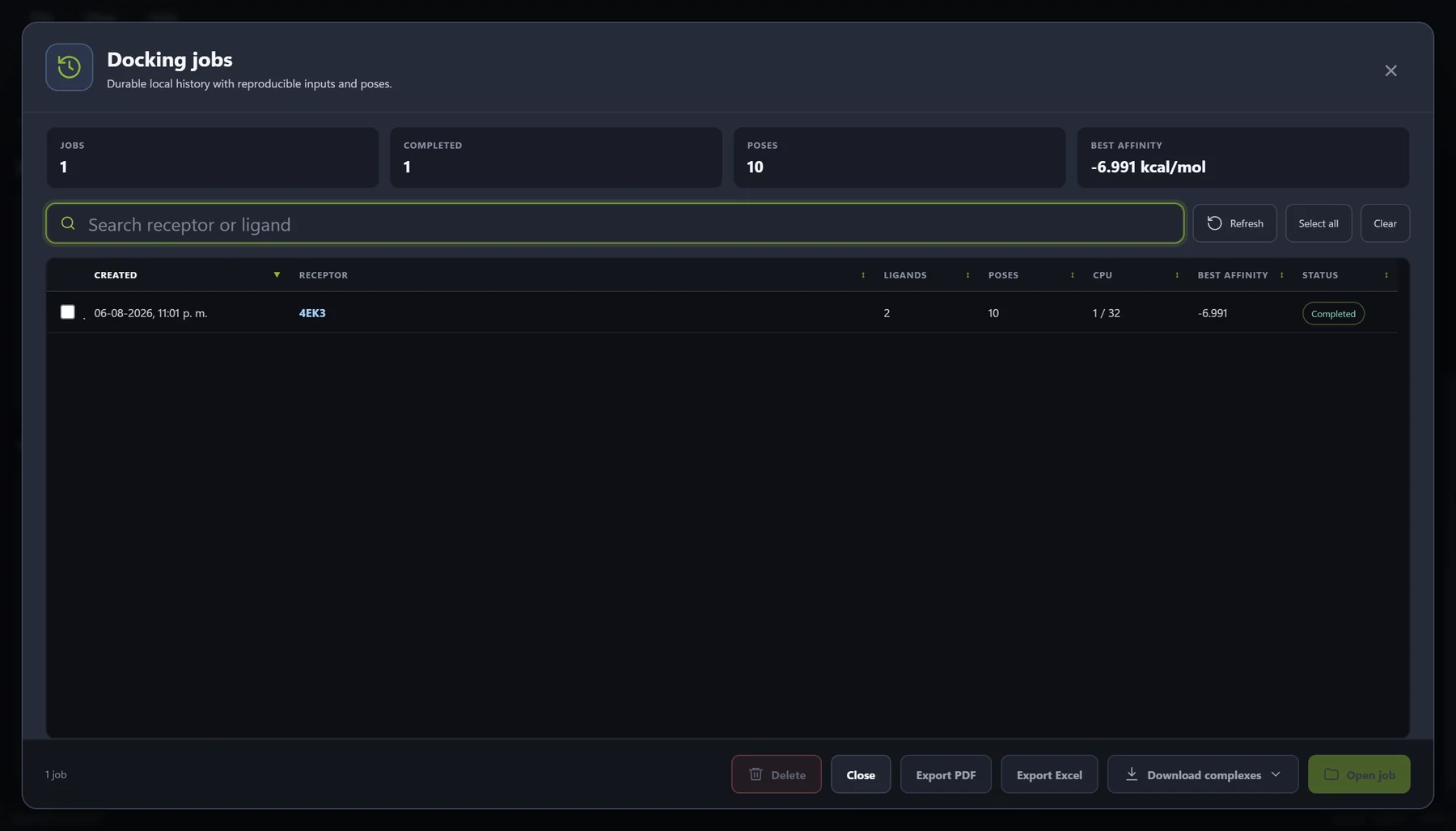
MolNexus 0.1.1 is BioChemIntelli's local Windows desktop workflow for receptor and ligand preparation, interaction-box setup, AutoDock Vina execution, pose review, export, and persistent job history. The current build accepts one or many supported ligand sources, prepares and reviews them, and can place up to 100 eligible ligands in one job. It then processes those ligands one at a time against one receptor while retaining per-ligand success or failure, poses, logs, preparation evidence, the box, Vina parameters, CPU allocation, and engine identity.
That is product behavior verified in the current application and tests. It is not evidence that MolNexus makes Vina more accurate, that every submitted chemistry is supported, or that a 100-ligand job has a guaranteed duration. The current development build integrates AutoDock Vina 1.2.7, whose official release record includes batch-directory support [6].
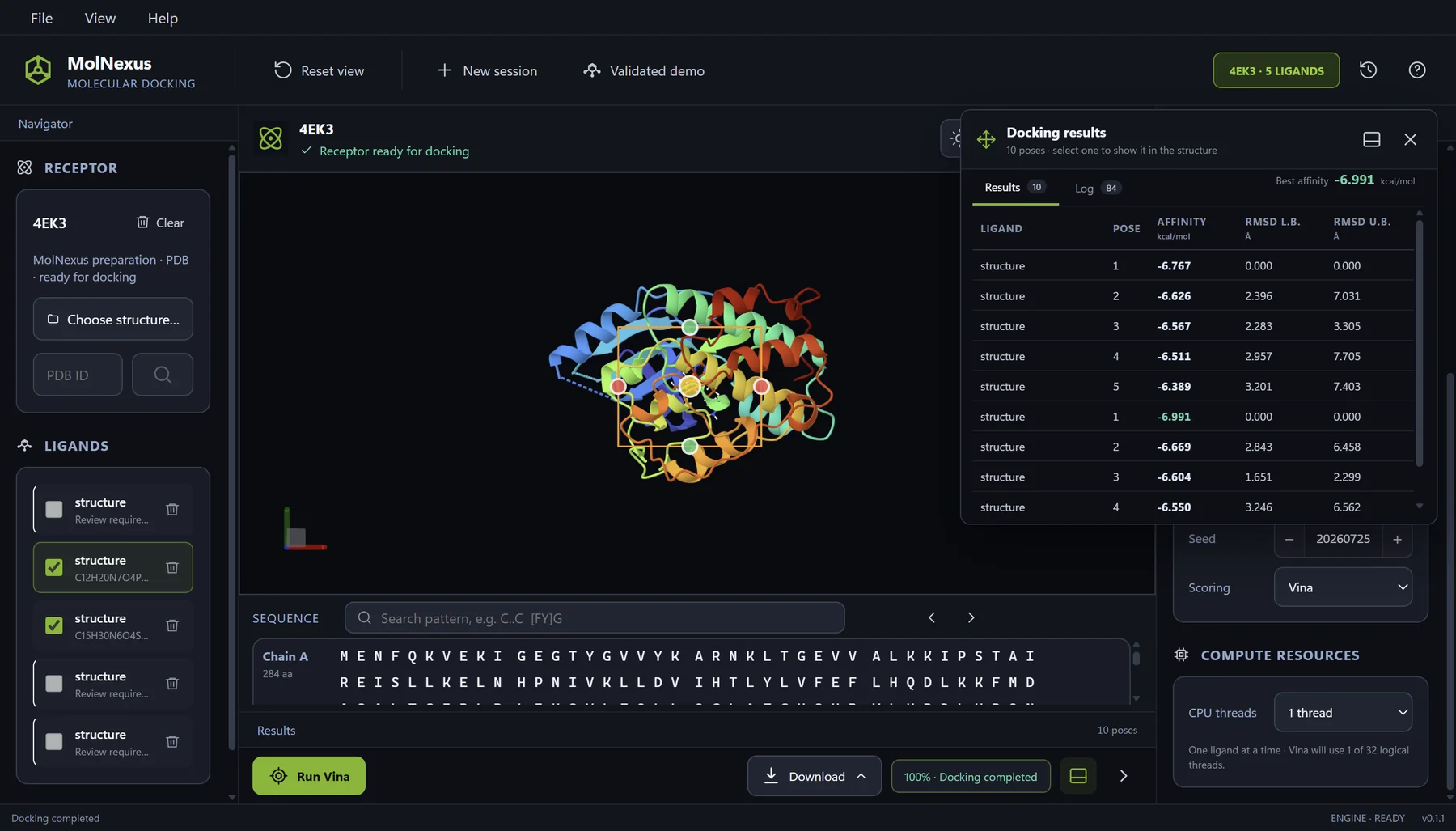
The documented case began with eight prespecified ligand files from the original YuelDesign dataset [7] and an explicitly prepared apo-CDK2 receptor derived from PDB 4EK3 [8]. The current preflight produced two Ready ligands, three Review outcomes, and three source-file rejections. Only the two Ready ligands entered this job. Preserving the other six outcomes is exactly what keeps the apparent two-of-two completion from being mistaken for the original submission denominator.
Current MolNexus product profile
| Application | MolNexus 0.1.1, local Windows desktop molecular docking software |
|---|---|
| Operating system | Windows 10 or Windows 11, 64-bit |
| Batch execution | Up to 100 eligible ligands per job, processed sequentially against one receptor |
| Docking engine | AutoDock Vina 1.2.7 with Vina and Vinardo scoring options |
| Inputs | PDB, CIF/mmCIF, or RCSB PDB identifier for receptors; SDF, MOL, MOL2, or PDBQT for ligands |
| Recorded workflow | Preparation evidence, interaction box, Vina settings, CPU allocation, per-ligand outcomes, poses, logs, and local SQLite job history |
| Exports | Result tables, CSV data, PDB protein-ligand complexes, and ZIP bundles |
| License | US$499 one-time purchase; one Windows PC at a time; perpetual use of the purchased version; 12 months of updates |
| Availability | Available now: free two-docking trial and US$499 one-time perpetual license |
Fit and non-fit for individual researchers and laboratories
Where the current workflow fits
| Buying route | Good fit to evaluate | Consider another workflow or additional infrastructure when |
|---|---|---|
| Individual professional purchase | A Windows researcher wants a local visual workflow for preparing, running, reviewing, and revisiting a focused ligand batch. | The work requires macOS or Linux, unattended cluster-scale screening, several receptors inside one job, or extensive custom scripting. |
| Laboratory or organizational evaluation | A method owner needs an inspectable one-PC workflow and evidence that parameters, failures, poses, and exports stay connected. | The organization requires multi-user deployment, a central shared database, distributed compute, or institutional licensing and procurement terms that are not currently published. |
Frequently asked questions
From a ligand folder to a defensible screen
A reliable batch is not defined by how many Vina processes finished. It is defined by whether every submitted molecule, preparation decision, protocol parameter, terminal state, pose, and export remains connected. Validate first, freeze the protocol, preserve the full denominator, and inspect poses before turning a score table into a shortlist.
If the immediate problem is keeping those relationships visible, the next useful comparison is the guide to organizing receptors, ligands, poses, and job history. If the protocol itself is not yet defensible, return to the workflow validation guide before scaling.
References
- Center for Computational Structural Biology. Docking in batch mode AutoDock Vina documentation Official documentation for sequential ligand batch execution, --batch and --dir behavior, output naming, Windows path considerations, and multi-receptor scripting.
- Center for Computational Structural Biology. Multiple ligands docking AutoDock Vina documentation Official documentation for simultaneous multiple-ligand docking, used to distinguish it from sequential batch mode.
- Center for Computational Structural Biology. Basic docking AutoDock Vina documentation Official tutorial for receptor and ligand PDBQT inputs, box configuration, exhaustiveness, scoring selection, and Vina output.
- Center for Computational Structural Biology. Frequently Asked Questions AutoDock Vina documentation Official explanations of stochastic search, random seeds, exhaustiveness, search-space size, runtime implications, and docking limitations.
- The Meeko authors. Basic ligand preparation Meeko documentation Official documentation for SDF inputs containing one or many molecules, explicit-hydrogen and 3D-coordinate requirements, and separate PDBQT outputs.
- AutoDock Vina maintainers. AutoDock Vina 1.2.7 release GitHub Releases (2025) Official release record for AutoDock Vina 1.2.7, including support for batch directories.
- Yuel J, Lai H, Zhang J, et al.. A Diffusion-Based Framework for Designing Molecules in Flexible Protein Pockets: Dataset Zenodo (2025) DOI: 10.5281/zenodo.17702010 Original dataset record for the YuelDesign CDK2 molecules used in the retained MolNexus demonstration.
- RCSB Protein Data Bank. 4EK3: Crystal structure of apo CDK2 RCSB PDB (2013) DOI: 10.2210/pdb4EK3/pdb Authoritative structure record for the apo-CDK2 receptor used in the retained MolNexus demonstration.